
This is a viewer only at the moment see the article on how this works.
To update the preview hit Ctrl-Alt-R (or ⌘-Alt-R on Mac) or Enter to refresh. The Save icon lets you save the markdown file to disk
This is a preview from the server running through my markdig pipeline
添加 Google Auth 而不使用 ASP @.#NET 身份数据库
Monday, 05 August 2024
一. 导言导言 导言 导言 导言
在此应用程序中, 我本想添加一个模拟机制, 允许登录在 App.App(%和一些行政任务@)#我打算为此使用 Google Auth+.+%I并不想为此目的使用 ASP=.+NET身份数据库 @.+I want to like the app尽量简单到尽可能长的时间.}
数据库是任何应用程序的强大组成部分,但是它们也增加了复杂性.}我想避免这种复杂程度 直到我真正需要它为止
步骤步骤
您需要首先在 Google 开发者控制台设置 Googo Auth , 您可以跟随此步骤 链接连接 来为您设置详细信息, 请使用 Google Client ID 和 secret. 。
一旦您有您的 Google 客户端身份和密秘@ , @ 您可以将其添加到您的 Appings @ .}json file @ MS K2}
    "Auth" :{
"GoogleClientId": "",
"GoogleClientSecret": ""
}
您如何不要检查这些内容到源控制@ . @ 代替本地开发, 您可以使用“ 密钥文件”\ MS K1
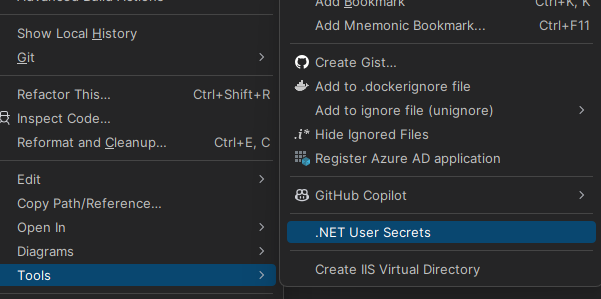
您可以在此添加您的 Google 客户端身份和密钥@( @ notte your client Id is @ '}实际上没有保密的@MS K2}因为您稍后会看到它在JS前端电话中包含的#'+%
    "Auth" :{
  "GoogleClientId": "ID",
  "GoogleClientSecret": "CLIENTSECRET"
}
使用 POCO 配置 Google Auth
注意我使用修改版的Steve Smith ' @s Iconfig consection@(}最近由Phil Haack).创名 这是为了避免我发现有点笨拙的 Options 东西, @ ( @ @ 很少需要,
在我的课里,我这样做 让我能从班上得到分节名 :
Click to expand
namespace Mostlylucid.Config;

public static class ConfigExtensions {
    public static TConfig ConfigurePOCO<TConfig>(this IServiceCollection services, IConfiguration configuration)
        where TConfig : class, new() {
        if (services == null) throw new ArgumentNullException(nameof(services));
        if (configuration == null) throw new ArgumentNullException(nameof(configuration));

        var config = new TConfig();
        configuration.Bind(config);
        services.AddSingleton(config);
        return config;
    }

    public static TConfig Configure<TConfig>(this WebApplicationBuilder builder)
        where TConfig : class, IConfigSection, new() {
        var services = builder.Services;
        var configuration = builder.Configuration;
        var sectionName = TConfig.Section;
        return services.ConfigurePOCO<TConfig>(configuration.GetSection(sectionName));
    }


    public static TConfig GetConfig<TConfig>(this WebApplicationBuilder builder)
        where TConfig : class, IConfigSection, new() {
        var configuration = builder.Configuration;
        var sectionName = TConfig.Section;
        var section = configuration.GetSection(sectionName).Get<TConfig>();
        return section;

    }

    public static Dictionary<string, object> GetConfigSection(this IConfiguration configuration, string sectionName) {
        var section = configuration.GetSection(sectionName);
        var result = new Dictionary<string, object>();
        foreach (var child in section.GetChildren()) {
            var key = child.Key;
            var value = child.Value;
            result.Add(key, value);
        }

        return result;
    }

    public static Dictionary<string, object> GetConfigSection<TConfig>(this WebApplicationBuilder builder)
        where TConfig : class, IConfigSection, new() {
        var configuration = builder.Configuration;
        var sectionName = TConfig.Section;
        return configuration.GetConfigSection(sectionName);
    }
}

public interface IConfigSection {
    public static abstract string Section { get; }
}
public class Auth : IConfigSection
{
    public static string Section => "Auth";
    public string GoogleClientId { get; set; }
    public string GoogleClientSecret { get; set; }

    public string AdminUserGoogleId { get; set; }

}
使用静态界面方法获取区域名称@.
然后在我的开办阶段 我可以做这个 :
var auth = builder.GetConfig<Auth>();
任何回到谷歌的东西\ NMSKO
程序@.%cs 设置
以实际添加此
services.AddCors(options =>
{
    options.AddPolicy("AllowMostlylucid",
        builder =>
        {
            builder.WithOrigins("https://www.mostlylucid.net")
                .WithOrigins("https://mostlylucid.net")
                .WithOrigins("https://localhost:7240")
                .AllowAnyHeader()
                .AllowAnyMethod();
        });
});

builder.Services
    .AddAuthentication(options =>
    {
        options.DefaultScheme = CookieAuthenticationDefaults.AuthenticationScheme;
        options.DefaultChallengeScheme = GoogleDefaults.AuthenticationScheme;


    })
    .AddCookie()
    .AddGoogle(options =>
    {
        options.ClientId = auth.GoogleClientId;
        options.ClientSecret = auth.GoogleClientSecret;
    });
您也可以在 Google 身份控制器中设置此选项@. @%
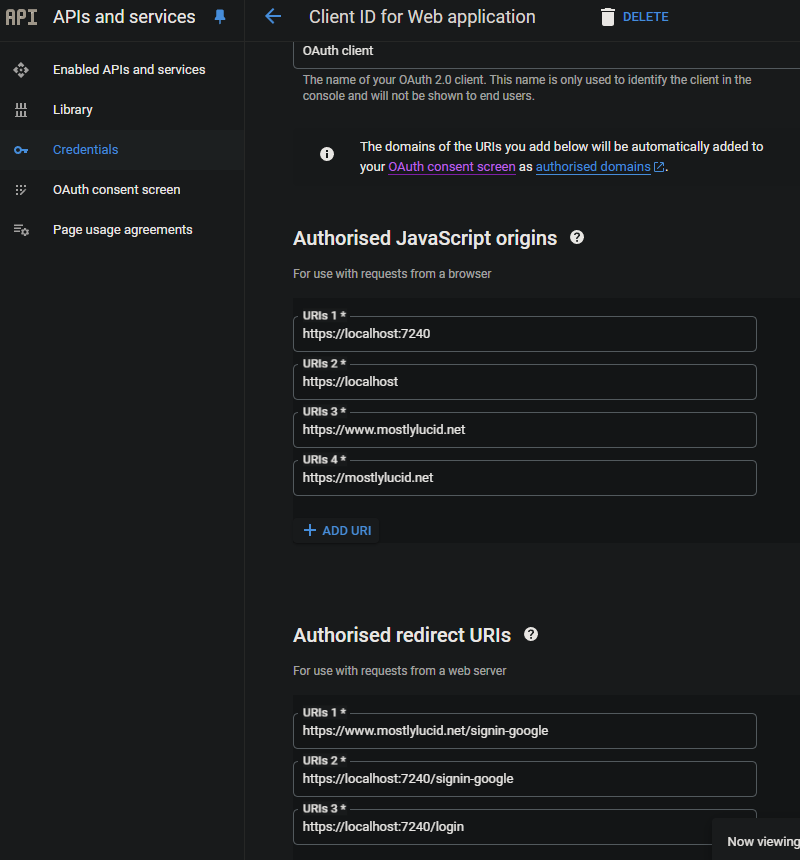
这将确保 Google Auth 只能在您指定的域中使用@ . @
Google Auth in Razor 谷歌在磁盘中
在我的 布局=.cshtml 我有这个 Javascription@ ,}这是我设置 Google 按钮并触发回调的地方 它记录 ASP.NET app.}
JS Google
<script src="https://accounts.google.com/gsi/client" async defer></script>
这是下面代码的下方
        function renderButton(element)
        {
            google.accounts.id.renderButton(
                element,
                {
                    type: "standard",
                    size: "large",
                    width: 200,
                    theme: "filled_black",
                    text: "sign_in_with",
                    shape: "rectangular",
                    logo_alignment: "left"
                }
            );
        }
        function initGoogleSignIn() {
            google.accounts.id.initialize({
                client_id: "839055275161-u7dqn2oco2729n6i5mk0fe7gap0bmg6g.apps.googleusercontent.com",
                callback: handleCredentialResponse
            });
            const element = document.getElementById('google_button');
            if (element) {
                renderButton(element);
            }
            const secondElement = document.getElementById('google_button2');
            if (secondElement) {
                renderButton(secondElement);
            }

        }

        function handleCredentialResponse(response) {
            if (response.credential) {
                const xhr = new XMLHttpRequest();
                xhr.open('POST', '/login', true);
                xhr.setRequestHeader('Content-Type', 'application/json');
                xhr.onload = function () {
                    if (xhr.status === 200) {
                        window.location.reload();
                    } else {
                        console.error('Failed to log in.');
                    }
                };
                xhr.send(JSON.stringify({ idToken: response.credential }));
            } else {
                console.error('No credential in response.');
            }
        }

        window.onload = initGoogleSignIn;
这里您可以看到,我在页面中有多达两个Div元素的 id Google @ }按钮和google@}%button2.}这些元素是谷歌联署材料将把纽扣变成.}
TIP :如果您正在使用尾风, 您可以按下按钮 div 来在暗模式下正确工作@(}否则它会在按钮周围造成白背景 @)}
<div class="w-[200px] h-[39px] overflow-hidden rounded">
    <div id="google_button">
    </div>
</div>
在上方的 JavaScript 中, 我将这篇文章发回给一个名为 Login.* 的主计长行动。
      const xhr = new XMLHttpRequest();
                xhr.open('POST', '/login', true);
                xhr.setRequestHeader('Content-Type', 'application/json');
                xhr.onload = function () {
                    if (xhr.status === 200) {
                        window.location.reload();
                    } else {
                        console.error('Failed to log in.');
                    }
                };
                xhr.send(JSON.stringify({ idToken: response.credential }));
主计长的Google Auths
主计长在此 ' @ it'}这很简单 它只需要在JWT@,#Docode
    [Route("login")]
        [HttpPost]
        public async Task<IActionResult> HandleGoogleCallback([FromBody] GoogleLoginRequest request)
        {
            var handler = new JwtSecurityTokenHandler();
            var jsonToken = handler.ReadToken(request.IdToken) as JwtSecurityToken;

            if (jsonToken == null)
            {
                return BadRequest("Invalid token");
            }

            var claimsIdentity = new ClaimsIdentity(
                jsonToken.Claims,
                GoogleDefaults.AuthenticationScheme);

            var authProperties = new AuthenticationProperties
            {
                IsPersistent = true
            };

            await HttpContext.SignInAsync(
                CookieAuthenticationDefaults.AuthenticationScheme,
                new ClaimsPrincipal(claimsIdentity),
                authProperties);

            return Ok();
        }
    }
注:: 这是't 省政府,因为上面写着 (}他们都是低级案件 MSC3 但它现在管用
用于提取登录属性的控制器基础类
在我的基地管理员里 我提取我需要的地产
      public record LoginData(bool loggedIn, string? name, string? avatarUrl, string? identifier);

    protected LoginData GetUserInfo()
    {
        var authenticateResult = HttpContext.AuthenticateAsync(CookieAuthenticationDefaults.AuthenticationScheme).Result;
        if (authenticateResult.Succeeded)
        {
            var principal = authenticateResult.Principal;
            if(principal == null)
            {
                return new LoginData(false, null, null, null);
            }
            var name = principal.FindFirst("name").Value;
            var avatarUrl =principal.FindFirst("picture").Value;
            var nameIdentifier = principal.FindFirst("sub");
            return new LoginData(true, name, avatarUrl, nameIdentifier?.Value);
        }
        return new LoginData(false,null,null,null);
    }
此选项允许您使用 Google 验证而不使用 ASP@. @NET 身份数据库 @.}