


npm 软件包可用 : 现以下列方式提供这一实施 @ mostlylucid/ permaid- envenancements @ 最优优/ 美人鱼增强 - 生产就绪npm软件包。 作为 npm 软件包的美人鱼增强 详细介绍如何在您的项目中使用它。
美人鱼是用文字创建图表的绝佳工具, 但默认的配置可能会限制复杂的图表。 用户无法轻易缩放以查看细节、 围绕大图表或导出它们以获取文档。 在本篇文章中, 我将展示如何用交互式的 Pan/ zoom 控制、 全屏光箱查看和导出功能( 包括 PNG 格式和 SVG 格式) 来加强这个网站的美人鱼图表 。
此项执行为生产准备就绪,处理暗色模式的优雅转换,并耐受云雾火箭装载器干扰。
我们要做的是这个。一个漂亮的页面(和流行版)美人鱼。j 显示的像GitHub的一样,但是。 更好意思图不使用 SCREENS, 但仍可以读取 。
在盒子外,美人鱼图有几个局限性:
我实施了一个全面强化系统 补充了:
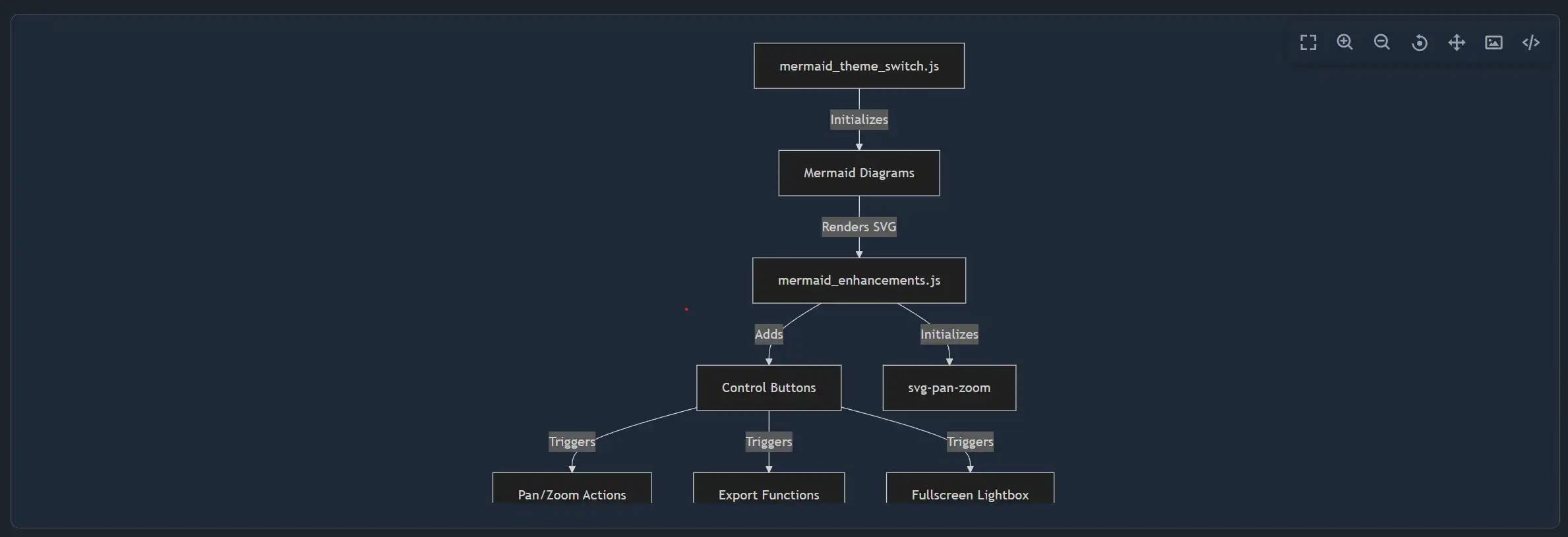
解决办法由三个主要部分组成:
graph TB
    A[mermaid_theme_switch.js] -->|Initializes| B[Mermaid Diagrams]
    B -->|Renders SVG| C[mermaid_enhancements.js]
    C -->|Adds| D[Control Buttons]
    C -->|Initializes| E[svg-pan-zoom]
    D -->|Triggers| F[Pan/Zoom Actions]
    D -->|Triggers| G[Export Functions]
    D -->|Triggers| H[Fullscreen Lightbox]
首先,安装所需的 npm 软件包:
npm install svg-pan-zoom html-to-image
这些图书馆提供:
svg-pan-zoom - SVG元素的交互式平板和缩放功能html-to-image - 出口SVG/PNNG功能主增强模块mermaid_enhancements.js处理所有交互式功能。
每个图表都有一个带有所有动作按钮的浮动控制面板 :
function createControlButtons(container, diagramId) {
    // Check if controls already exist
    if (container.querySelector('.mermaid-controls')) {
        return;
    }

    const controlsDiv = document.createElement('div');
    controlsDiv.className = 'mermaid-controls';

    const buttons = [
        { icon: 'bx-fullscreen', title: 'Fullscreen', action: 'fullscreen' },
        { icon: 'bx-zoom-in', title: 'Zoom In', action: 'zoomIn' },
        { icon: 'bx-zoom-out', title: 'Zoom Out', action: 'zoomOut' },
        { icon: 'bx-reset', title: 'Reset View', action: 'reset' },
        { icon: 'bx-move', title: 'Pan', action: 'pan' },
        { icon: 'bx-image', title: 'Export as PNG', action: 'exportPng' },
        { icon: 'bx-code-alt', title: 'Export as SVG', action: 'exportSvg' }
    ];

    buttons.forEach(btn => {
        const button = document.createElement('button');
        button.className = `mermaid-control-btn bx ${btn.icon}`;
        button.setAttribute('title', btn.title);
        button.setAttribute('aria-label', btn.title);
        button.setAttribute('data-action', btn.action);
        button.setAttribute('data-diagram-id', diagramId);
        controlsDiv.appendChild(button);
    });

    container.appendChild(controlsDiv);
}
Svg-pan-zoom 图书馆提供光滑、 表现性的互动:
function initPanZoom(svgElement, diagramId) {
    // Clean up existing instance if present
    if (panZoomInstances.has(diagramId)) {
        try {
            panZoomInstances.get(diagramId).destroy();
        } catch (e) {
            console.warn('Failed to destroy existing pan-zoom instance:', e);
        }
        panZoomInstances.delete(diagramId);
    }

    try {
        const panZoomInstance = svgPanZoom(svgElement, {
            zoomEnabled: true,
            controlIconsEnabled: false, // We use custom controls
            fit: true,
            center: true,
            minZoom: 0.1,
            maxZoom: 10,
            zoomScaleSensitivity: 0.3,
            dblClickZoomEnabled: true,
            mouseWheelZoomEnabled: true,
            preventMouseEventsDefault: true,
            contain: false
        });

        panZoomInstances.set(diagramId, panZoomInstance);
        return panZoomInstance;
    } catch (error) {
        console.error('Failed to initialize pan-zoom:', error);
        return null;
    }
}
出口系统保留图表质量,处理巴布亚新几内亚和SVG格式:
async function exportDiagram(container, format, diagramId) {
    try {
        const svgElement = container.querySelector('svg');
        if (!svgElement) {
            window.showToast && window.showToast('No diagram found to export', 3000, 'error');
            return;
        }

        // Clone the SVG to avoid modifying the original
        const clonedSvg = svgElement.cloneNode(true);

        // Get the viewBox or calculate from bounding box
        let viewBox = clonedSvg.getAttribute('viewBox');
        if (!viewBox) {
            const bbox = svgElement.getBBox();
            viewBox = `${bbox.x} ${bbox.y} ${bbox.width} ${bbox.height}`;
            clonedSvg.setAttribute('viewBox', viewBox);
        }

        // Parse viewBox to get dimensions
        const [, , vbWidth, vbHeight] = viewBox.split(' ').map(Number);

        // Set explicit dimensions based on viewBox for proper export
        clonedSvg.setAttribute('width', vbWidth);
        clonedSvg.setAttribute('height', vbHeight);

        // Remove inline styles but keep viewBox
        clonedSvg.removeAttribute('style');
        clonedSvg.style.backgroundColor = 'transparent';
        clonedSvg.style.maxWidth = 'none';

        // Create temporary container
        const tempDiv = document.createElement('div');
        tempDiv.style.position = 'absolute';
        tempDiv.style.left = '-9999px';
        tempDiv.appendChild(clonedSvg);
        document.body.appendChild(tempDiv);

        let dataUrl;
        const timestamp = new Date().toISOString().replace(/[:.]/g, '-');
        const filename = `mermaid-diagram-${timestamp}`;

        if (format === 'png') {
            dataUrl = await toPng(clonedSvg, {
                backgroundColor: 'white',
                pixelRatio: 2 // Higher quality
            });
            downloadFile(dataUrl, `${filename}.png`);
        } else {
            dataUrl = await toSvg(clonedSvg, {
                backgroundColor: 'transparent'
            });
            downloadFile(dataUrl, `${filename}.svg`);
        }

        // Clean up
        document.body.removeChild(tempDiv);

        window.showToast && window.showToast(`Diagram exported as ${format.toUpperCase()}`, 3000, 'success');
    } catch (error) {
        console.error('Failed to export diagram:', error);
        window.showToast && window.showToast('Failed to export diagram', 3000, 'error');
    }
}
关键出口考虑因素:
pixelRatio: 2 巴布亚新几内亚出口出口光箱提供沉浸式观赏经验:
function openFullscreenLightbox(container, diagramId) {
    const svgElement = container.querySelector('svg');
    if (!svgElement) return;

    // Create lightbox overlay
    const lightbox = document.createElement('div');
    lightbox.className = 'mermaid-lightbox';
    lightbox.innerHTML = `
        <div class="mermaid-lightbox-content">
            <button class="mermaid-lightbox-close bx bx-x" aria-label="Close"></button>
            <div class="mermaid-lightbox-diagram-wrapper">
                <div class="mermaid-lightbox-diagram"></div>
            </div>
        </div>
    `;

    // Clone and prepare SVG
    const clonedSvg = svgElement.cloneNode(true);
    clonedSvg.removeAttribute('width');
    clonedSvg.removeAttribute('height');
    clonedSvg.style.width = '100%';
    clonedSvg.style.height = '100%';

    const diagramContainer = lightbox.querySelector('.mermaid-lightbox-diagram');
    diagramContainer.appendChild(clonedSvg);

    // Add controls to lightbox
    const wrapper = lightbox.querySelector('.mermaid-lightbox-diagram-wrapper');
    const lightboxDiagramId = `${diagramId}-lightbox`;
    createControlButtons(wrapper, lightboxDiagramId);

    document.body.appendChild(lightbox);

    // Initialize pan-zoom after layout completes
    setTimeout(() => {
        const panZoom = initPanZoom(clonedSvg, lightboxDiagramId);
        if (panZoom) {
            panZoom.resize();
            panZoom.fit();
            panZoom.center();
        }
    }, 100);

    // Close handlers
    const closeLightbox = () => {
        if (panZoomInstances.has(lightboxDiagramId)) {
            try {
                panZoomInstances.get(lightboxDiagramId).destroy();
            } catch (e) {
                console.warn('Failed to destroy lightbox pan-zoom:', e);
            }
            panZoomInstances.delete(lightboxDiagramId);
        }
        lightbox.remove();
    };

    lightbox.querySelector('.mermaid-lightbox-close').addEventListener('click', closeLightbox);
    lightbox.addEventListener('click', (e) => {
        if (e.target === lightbox) closeLightbox();
    });

    // ESC key to close
    const escHandler = (e) => {
        if (e.key === 'Escape') {
            closeLightbox();
            document.removeEventListener('keydown', escHandler);
        }
    };
    document.addEventListener('keydown', escHandler);
}
这把一切连接在一起 被美人鱼创造后称为美人鱼
export function enhanceMermaidDiagrams() {
    const diagrams = document.querySelectorAll('.mermaid[data-processed="true"]');

    diagrams.forEach(diagram => {
        const svgElement = diagram.querySelector('svg');
        if (!svgElement) return;

        // CRITICAL: Remove inline max-width constraint that Mermaid adds
        svgElement.style.maxWidth = 'none';

        // Wrap diagram with controls
        const diagramId = wrapDiagramWithControls(diagram);

        // Initialize pan/zoom and auto-fit
        const panZoom = initPanZoom(svgElement, diagramId);
        if (panZoom) {
            // Fit diagram to container by default
            setTimeout(() => {
                panZoom.resize();
                panZoom.fit();
                panZoom.center();
            }, 100);
        }
    });

    // Set up event delegation for control buttons (only once)
    if (!document.body.hasAttribute('data-mermaid-controls-initialized')) {
        document.body.addEventListener('click', handleControlClick);
        document.body.setAttribute('data-mermaid-controls-initialized', 'true');
    }
}
关键修正 : 美人鱼适用内线 style="max-width: 1020px" SVG 元素, 防止全宽显示。 删除它对于正确反应行为至关重要 。
主题切换器确保图在光和暗模式之间切换时正确重现 :
import { enhanceMermaidDiagrams } from './mermaid_enhancements';

const loadMermaid = async (theme) => {
    if (!window.mermaid) return;
    try {
        window.mermaid.initialize({
            startOnLoad: false,
            theme,
            themeVariables: {
                background: 'transparent'
            }
        });
        await window.mermaid.run({
            querySelector: elementSelector,
        });

        // Enhance diagrams after rendering completes
        // Use requestAnimationFrame for better timing
        await new Promise(resolve => {
            requestAnimationFrame(() => {
                requestAnimationFrame(() => {
                    enhanceMermaidDiagrams();
                    resolve();
                });
            });
        });
    } catch (err) {
        console.error('Mermaid render error:', err);
    }
};
使用 requestAnimationFrame 两次确保浏览器完成SVG的绘画,然后我们才能加固它。
Cloudflare的火箭装载器可以延迟 JavaScript 执行, 中断初始化 。 以下是防弹解决方案 :
// Wait for all dependencies to load with exponential backoff
function waitForDependencies(maxAttempts = 50) {
    return new Promise((resolve) => {
        let attempts = 0;

        const checkDependencies = () => {
            attempts++;

            const depsReady =
                typeof window.hljs !== 'undefined' &&
                typeof window.mermaid !== 'undefined' &&
                typeof window.Alpine !== 'undefined' &&
                typeof window.htmx !== 'undefined';

            if (depsReady) {
                console.log('All dependencies loaded after', attempts, 'attempts');

                // Start Alpine.js now that it's loaded
                if (window.Alpine && !window.Alpine.version) {
                    try {
                        window.Alpine.start();
                        console.log('Alpine.js started');
                    } catch (err) {
                        console.error('Failed to start Alpine:', err);
                    }
                }

                resolve();
            } else if (attempts >= maxAttempts) {
                console.warn('Timeout waiting for dependencies');
                resolve(); // Continue anyway
            } else {
                // Retry with exponential backoff
                const delay = Math.min(50 * Math.pow(1.2, attempts), 500);
                setTimeout(checkDependencies, delay);
            }
        };

        checkDependencies();
    });
}

// Robust initialization
async function safeInitialize() {
    try {
        await waitForDependencies();

        if (document.readyState === 'loading') {
            await new Promise(resolve => {
                document.addEventListener('DOMContentLoaded', resolve, { once: true });
            });
        }

        await initializePage();
    } catch (err) {
        console.error('Failed to initialize page:', err);
        // Retry once after delay
        setTimeout(() => {
            initializePage().catch(e => console.error('Retry failed:', e));
        }, 1000);
    }
}

safeInitialize();
也确保你的主要剧本有 data-cfasync="false" 将它从“火箭加载器”中排除的属性 :
<script src="~/js/dist/main.js" type="module" asp-append-version="true" data-cfasync="false"></script>
CSS使用尾风公用事业类和按惯例的抛光样式:
/* Mermaid diagram wrapper */
.mermaid-wrapper {
    @apply relative rounded-lg overflow-hidden w-full;
    margin: 1rem 0;
}

.mermaid-wrapper .mermaid {
    @apply m-0 w-full;
    min-height: 500px;
    display: flex;
    align-items: center;
    justify-content: center;
    padding: 1rem;
}

.mermaid-wrapper .mermaid svg {
    width: 100% !important;
    height: auto !important;
    min-height: 450px;
}

/* Control buttons */
.mermaid-controls {
    @apply absolute top-2 right-2 flex gap-1 z-10;
    background: rgba(255, 255, 255, 0.9);
    border-radius: 0.5rem;
    padding: 0.25rem;
    box-shadow: 0 2px 8px rgba(0, 0, 0, 0.1);
}

.dark .mermaid-controls {
    background: rgba(31, 41, 55, 0.95);
    box-shadow: 0 2px 8px rgba(0, 0, 0, 0.3);
}

.mermaid-control-btn {
    @apply p-2 rounded cursor-pointer transition-all duration-200;
    background: transparent;
    border: none;
    color: #4b5563;
    font-size: 1.25rem;
    display: flex;
    align-items: center;
    justify-content: center;
    width: 2rem;
    height: 2rem;
}

.mermaid-control-btn:hover {
    background: rgba(37, 99, 235, 0.1);
    color: #2563eb;
    transform: scale(1.1);
}

.dark .mermaid-control-btn {
    color: #9ca3af;
}

.dark .mermaid-control-btn:hover {
    background: rgba(55, 65, 81, 0.8);
    color: #60a5fa;
}

/* Lightbox */
.mermaid-lightbox {
    @apply fixed inset-0 z-50 flex items-center justify-center;
    background: rgba(0, 0, 0, 0.85);
    backdrop-filter: blur(4px);
    animation: fadeIn 0.2s ease-out;
}

.dark .mermaid-lightbox {
    background: rgba(0, 0, 0, 0.95);
}

.mermaid-lightbox-content {
    @apply relative w-11/12 h-5/6 bg-white rounded-lg shadow-2xl;
    max-width: 1400px;
}

.dark .mermaid-lightbox-content {
    @apply bg-gray-800;
}

.mermaid-lightbox-close {
    @apply absolute top-4 right-4 z-10 p-2 rounded-full cursor-pointer transition-all;
    background: rgba(0, 0, 0, 0.5);
    border: none;
    color: white;
    font-size: 2rem;
    width: 3rem;
    height: 3rem;
    display: flex;
    align-items: center;
    justify-content: center;
}

.mermaid-lightbox-close:hover {
    background: rgba(220, 38, 38, 0.8);
    transform: scale(1.1);
}

@keyframes fadeIn {
    from { opacity: 0; }
    to { opacity: 1; }
}
以下是如何验证一切工作原理:
适当初始化后,您应该看到:
All dependencies loaded after 1 attempts
Alpine.js started
Highlight.js copy plugin registered
Highlight.js initialized on page load
Mermaid initialized on page load
Document is ready - all initializations complete
HTMX event listener registered successfully
在HTMX交换后,你应该看到:
HTMX afterSettle triggered for: contentcontainer
Highlight.js applied after HTMX swap
Mermaid initialized
Mermaid applied after HTMX swap
HTMX afterSettle complete for: contentcontainer
测试和研究:
不支持 IE11 不支持 IE11 由于现代 JavaScript 特性( 结点、 箭头函数、 async/ wait、 请求动画Frame) 的缘故 。
这一全面提升将静态美人鱼图表转化为互动的可出口可视化。 实施为生产准备,适应边缘案例,并提供了出色的用户经验。
密钥取走 :
max-width 用于全宽图表的限制您现在可以将此功能安装为 npm 软件包, 而不是复制代码 :
npm install @mostlylucid/mermaid-enhancements
import { init } from '@mostlylucid/mermaid-enhancements';
import '@mostlylucid/mermaid-enhancements/styles.css';

await init();
见见 作为 npm 软件包的美人鱼增强 完整文件、框架集成示例和高级配置选项。
完整的源代码也可在本博客的库库中查到 Mostlylucid/src/js/mermaid_enhancements.js 并且作为开放源代码 npm 软件包 多数是网/多数是网/大多数是美人鱼.
以下是一个复杂的例子, 显示了这个博客内容系统的结构:
graph TB
    subgraph Client["Client Browser"]
        A[User Request] -->|HTMX| B[Blog Controller]
        B -->|Cache Miss| C[Blog Service]
        C -->|File Mode| D[Markdown Service]
        C -->|DB Mode| E[EF Core Context]
        D -->|Parse| F[Markdig Pipeline]
        F -->|Render| G[HTML + Mermaid]
        E -->|Query| H[PostgreSQL]
        H -->|Full-Text Search| I[GIN Index]
        G -->|Enhance| J[mermaid_enhancements.js]
        J -->|Initialize| K[svg-pan-zoom]
        J -->|Add| L[Control Buttons]
        L -->|Export| M[html-to-image]
    end

    subgraph Background["Background Services"]
        N[File Watcher] -->|Change Detected| O[Saves to DB]
        O -->|Trigger| P[Translation Service]
        P -->|Batch| Q[EasyNMT API]
        Q -->|12 Languages| R[Translated Files]
    end

    style A stroke:#22c55e,stroke-width:3px,color:#4ade80
    style G stroke:#3b82f6,stroke-width:3px,color:#60a5fa
    style J stroke:#f59e0b,stroke-width:3px,color:#f59e0b
    style K stroke:#ec4899,stroke-width:3px,color:#ec4899
    style M stroke:#8b5cf6,stroke-width:3px,color:#8b5cf6
尝试点击上面图表上的控件 !

© 2026 Scott Galloway — Unlicense — All content and source code on this site is free to use, copy, modify, and sell.
