
Google Auth toevoegen zonder ASP.NET Identiteitsdatabase


Inleiding
In deze app wilde ik een sample-mechanisme toevoegen dat het aanteken toelaat commentaar te voegen ( en een aantal adminstakken) in de app te zetten . Ik wilde Google Auth gebruiken voor dit doel
Databanken zijn een krachtige component van elke toepassing, maar ze voegen ook complexiteit toe.
Stappen
Eerst moet je Google Auth opzetten in de Google Developer Console. Je kunt de stappen hierin volgen. Link om je details op te stellen Google Client ID en Secret.
Als je je Google-Client Id en Secret hebt, kun je ze toevoegen aan je appsettingsM SK1json file.
    "Auth" :{
"GoogleClientId": "",
"GoogleClientSecret": ""
}
Hoe dan ook moet je deze niet in de broncontrole checken. In plaats van voor lokale ontwikkeling kan je de Secrets-file gebruiken:
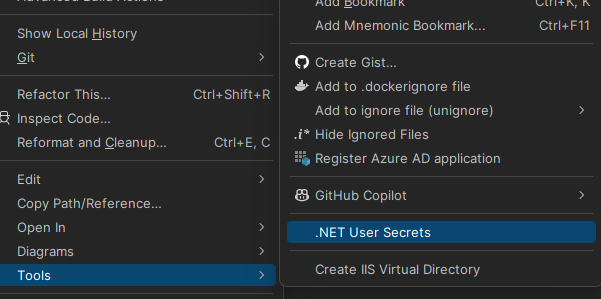
Daarin kan je je Google-Client Id en Secret toevoegen. (Noteer dat je Client ID niet geheim is'dit is niet echt vertrouwbaar , zoals jij het later zal zien.
    "Auth" :{
  "GoogleClientId": "ID",
  "GoogleClientSecret": "CLIENTSECRET"
}
Konfigureren van Google Auth met POCO
Nota Ik gebruik een gemodificeerde versie van Steve Smith's IConfigSection (recently made famous by Phil Haack Dit is om de I-opties te vermijden, wat ik een beetje rommelig vind ( en zelden nodig heb omdat ik bijna nooit konfiguratie verander na het inzetten van mijn scenario's.
In mijn doe ik dit waardoor ik de sectienaam van de klas zelf kan krijgen:
Click to expand
namespace Mostlylucid.Config;

public static class ConfigExtensions {
    public static TConfig ConfigurePOCO<TConfig>(this IServiceCollection services, IConfiguration configuration)
        where TConfig : class, new() {
        if (services == null) throw new ArgumentNullException(nameof(services));
        if (configuration == null) throw new ArgumentNullException(nameof(configuration));

        var config = new TConfig();
        configuration.Bind(config);
        services.AddSingleton(config);
        return config;
    }

    public static TConfig Configure<TConfig>(this WebApplicationBuilder builder)
        where TConfig : class, IConfigSection, new() {
        var services = builder.Services;
        var configuration = builder.Configuration;
        var sectionName = TConfig.Section;
        return services.ConfigurePOCO<TConfig>(configuration.GetSection(sectionName));
    }


    public static TConfig GetConfig<TConfig>(this WebApplicationBuilder builder)
        where TConfig : class, IConfigSection, new() {
        var configuration = builder.Configuration;
        var sectionName = TConfig.Section;
        var section = configuration.GetSection(sectionName).Get<TConfig>();
        return section;

    }

    public static Dictionary<string, object> GetConfigSection(this IConfiguration configuration, string sectionName) {
        var section = configuration.GetSection(sectionName);
        var result = new Dictionary<string, object>();
        foreach (var child in section.GetChildren()) {
            var key = child.Key;
            var value = child.Value;
            result.Add(key, value);
        }

        return result;
    }

    public static Dictionary<string, object> GetConfigSection<TConfig>(this WebApplicationBuilder builder)
        where TConfig : class, IConfigSection, new() {
        var configuration = builder.Configuration;
        var sectionName = TConfig.Section;
        return configuration.GetConfigSection(sectionName);
    }
}

public interface IConfigSection {
    public static abstract string Section { get; }
}
public class Auth : IConfigSection
{
    public static string Section => "Auth";
    public string GoogleClientId { get; set; }
    public string GoogleClientSecret { get; set; }

    public string AdminUserGoogleId { get; set; }

}
Waar ik een statische interface-methode gebruik om de sectienaam te krijgen.
Dan kan ik in mijn startup dit doen:
var auth = builder.GetConfig<Auth>();
Hoe dan ook terug naar de google dingen!
Programma.cs Opstelling
Om dit toe te voegen.
services.AddCors(options =>
{
    options.AddPolicy("AllowMostlylucid",
        builder =>
        {
            builder.WithOrigins("https://www.mostlylucid.net")
                .WithOrigins("https://mostlylucid.net")
                .WithOrigins("https://localhost:7240")
                .AllowAnyHeader()
                .AllowAnyMethod();
        });
});

builder.Services
    .AddAuthentication(options =>
    {
        options.DefaultScheme = CookieAuthenticationDefaults.AuthenticationScheme;
        options.DefaultChallengeScheme = GoogleDefaults.AuthenticationScheme;


    })
    .AddCookie()
    .AddGoogle(options =>
    {
        options.ClientId = auth.GoogleClientId;
        options.ClientSecret = auth.GoogleClientSecret;
    });
Je moet dit ook in de google-identiteitsconsole opstellen.
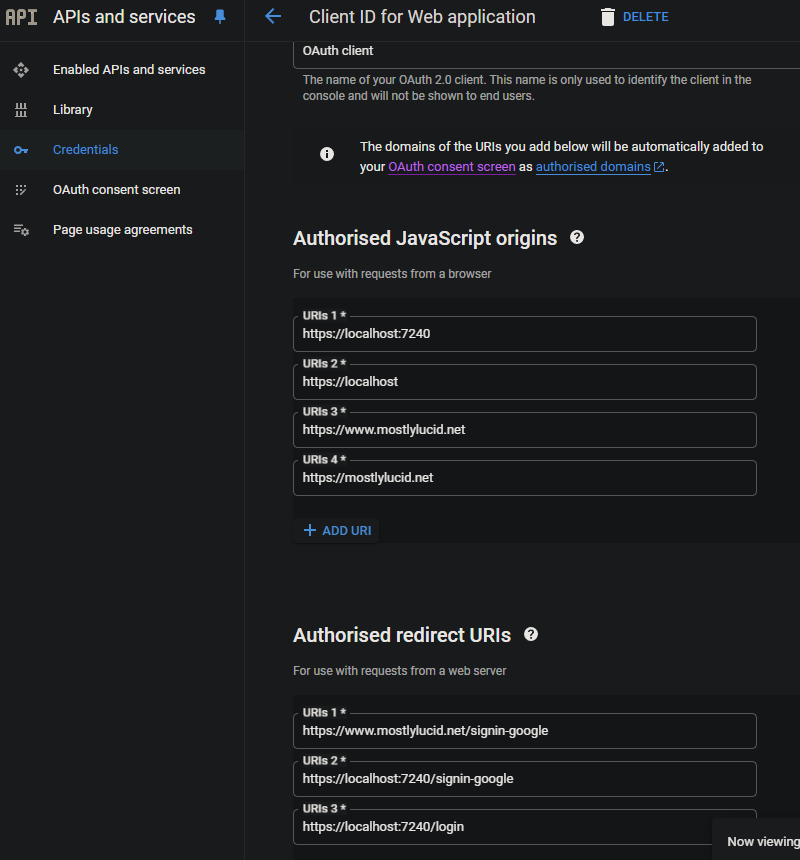
Dit zorgt ervoor dat de Google Auth alleen gebruikt kan worden vanuit de domeinen die je specifiek hebt.
Google Auth In Razor
In mijn _Uitleg.cshtml Ik heb dit Javascript, hier stel ik mijn Google-knoppen op en activeer een terugroep die de ASP-app logt.
Google JS
<script src="https://accounts.google.com/gsi/client" async defer></script>
Dit is de dlow voor de code onder.
        function renderButton(element)
        {
            google.accounts.id.renderButton(
                element,
                {
                    type: "standard",
                    size: "large",
                    width: 200,
                    theme: "filled_black",
                    text: "sign_in_with",
                    shape: "rectangular",
                    logo_alignment: "left"
                }
            );
        }
        function initGoogleSignIn() {
            google.accounts.id.initialize({
                client_id: "839055275161-u7dqn2oco2729n6i5mk0fe7gap0bmg6g.apps.googleusercontent.com",
                callback: handleCredentialResponse
            });
            const element = document.getElementById('google_button');
            if (element) {
                renderButton(element);
            }
            const secondElement = document.getElementById('google_button2');
            if (secondElement) {
                renderButton(secondElement);
            }

        }

        function handleCredentialResponse(response) {
            if (response.credential) {
                const xhr = new XMLHttpRequest();
                xhr.open('POST', '/login', true);
                xhr.setRequestHeader('Content-Type', 'application/json');
                xhr.onload = function () {
                    if (xhr.status === 200) {
                        window.location.reload();
                    } else {
                        console.error('Failed to log in.');
                    }
                };
                xhr.send(JSON.stringify({ idToken: response.credential }));
            } else {
                console.error('No credential in response.');
            }
        }

        window.onload = initGoogleSignIn;
Hier zie je dat ik tot twee div-elementen heb op de pagina met het id google_knop en google _knop2. Dit zijn de elementen die de Google JS de knoppen in willedelen.
TIP: Als je Tailwind gebruikt, kun je de knop div schinken om correct te werken in donkere mode M SK2 anders geeft het een witte achtergrond rond de buttonMSC3
<div class="w-[200px] h-[39px] overflow-hidden rounded">
    <div id="google_button">
    </div>
</div>
In de above JavaScript post ik dit terug naar een Controller-aktie genaamd Login. Dit is waar ik het Google Auth handle.
      const xhr = new XMLHttpRequest();
                xhr.open('POST', '/login', true);
                xhr.setRequestHeader('Content-Type', 'application/json');
                xhr.onload = function () {
                    if (xhr.status === 200) {
                        window.location.reload();
                    } else {
                        console.error('Failed to log in.');
                    }
                };
                xhr.send(JSON.stringify({ idToken: response.credential }));
Google Auth in de Controller
De Controller is hier.
    [Route("login")]
        [HttpPost]
        public async Task<IActionResult> HandleGoogleCallback([FromBody] GoogleLoginRequest request)
        {
            var handler = new JwtSecurityTokenHandler();
            var jsonToken = handler.ReadToken(request.IdToken) as JwtSecurityToken;

            if (jsonToken == null)
            {
                return BadRequest("Invalid token");
            }

            var claimsIdentity = new ClaimsIdentity(
                jsonToken.Claims,
                GoogleDefaults.AuthenticationScheme);

            var authProperties = new AuthenticationProperties
            {
                IsPersistent = true
            };

            await HttpContext.SignInAsync(
                CookieAuthenticationDefaults.AuthenticationScheme,
                new ClaimsPrincipal(claimsIdentity),
                authProperties);

            return Ok();
        }
    }
NOTA: Dit is niet't prefect omdat het de claimnamen opschreef M SK2ze zijn allemaal kleinletters ) maar het werkt voor nu.
Controller Base Class om de aanteken-eigenschappen te extraheren
In mijn BaseController haal ik de nodige eigenschappen uit;
      public record LoginData(bool loggedIn, string? name, string? avatarUrl, string? identifier);

    protected LoginData GetUserInfo()
    {
        var authenticateResult = HttpContext.AuthenticateAsync(CookieAuthenticationDefaults.AuthenticationScheme).Result;
        if (authenticateResult.Succeeded)
        {
            var principal = authenticateResult.Principal;
            if(principal == null)
            {
                return new LoginData(false, null, null, null);
            }
            var name = principal.FindFirst("name").Value;
            var avatarUrl =principal.FindFirst("picture").Value;
            var nameIdentifier = principal.FindFirst("sub");
            return new LoginData(true, name, avatarUrl, nameIdentifier?.Value);
        }
        return new LoginData(false,null,null,null);
    }
Dit maakt het mogelijk om Gooogle Authentication te gebruiken zonder de ASP-databasis te gebruiken.