This is a viewer only at the moment see the article on how this works.
To update the preview hit Ctrl-Alt-R (or ⌘-Alt-R on Mac) or Enter to refresh. The Save icon lets you save the markdown file to disk
This is a preview from the server running through my markdig pipeline
Tuesday, 06 January 2026
भाग 1-3 एक अमूर्त पैटर्न के रूप में संबद्ध अस्पष्टता का वर्णन
नोट: अभी भी तंत्र को ट्यून कर रहा है. लेकिन वहाँ है ' अब एक डेस्कटॉप संस्करण और CLI के रूप में यह बहुत अच्छी तरह से काम करता है लेकिन कुछ किनारे सुचारू करने के लिए
यह लेख कई प्रयोजनों का काम करता है
ImageSummarizer एक RAG इंजेक्शन पाइपलाइन है जो संरचनात्मक मेटाडेटा को निकालता है। तरंग- आधारित वास्तुकला. सिस्टम त्वरित स्थानीय विश्लेषण से शिथिल होता है
प्रमुख सिद्धांत
ImageSummarizer दिखाता है कि बहुमोडल एलएलएम बिना निर्णायकता को छोड़े उपयोग किया जा सकता है संभाव्यता प्रस्ताव करता है.
डिजाइन नियम
- नमूने कभी अन्य नमूनाओं को खपत नहीं करते
- प्राकृतिक भाषा कभी भी राज्य नहीं है
- Escalation deterministic thresholds है
- प्रत्येक आउटपुट में विश्वास + प्रामाणिकता होती है



पाइपलाइन RAG सिस्टम के लिए छवियों से संरचनात्मक मेटाडेटा निकालता है
कुंजी शब्द है संगठितप्रत्येक आउटपुट में विश्वास प्राप्तांक है
गहरी डुबोई: ओसीआर पाइपलाइन अपनी वस्तु की गारंटी देने के लिए पर्याप्त जटिल है भाग 4.1: The Three-Tier OCR पाइपलाइन के लिए पूरा तकनीकी विच्छेदन शामिल है ईस्ट
सिस्टम को पाठ निष्कर्षण के लिए तीन स्तरों की वृद्धि रणनीति का उपयोग करता है
| टियर | विधि | गति & #44; | लागत | |||||
|---|---|---|---|---|---|---|---|---|
| 1 | टेसरेक्टCity name (optional, probably does not need a translation) मुक्त | |||||||
| 2 | फ्लोरेंस निःशुल्क | शैलीकृत फ़ॉन्टों, कोई API लागत नहीं | ||||||
| 3 | दृश्य एलएलएम ठ̧à¥à¤°à¥à¤ |
ऑनिक्स पाठ पहचान (पूर्व, क्रैफ्टअधिकतम पथ निर्धारित करता है
परिणामस्थानीय ONNX मॉडलों की GB जो API लागत के बिना छवियों को संभालते हैं

$ imagesummarizer demo-images/cat_wag.gif --pipeline caption --output text
Caption: A cat is sitting on a white couch.
Scene: indoor
Motion: MODERATE object_motion motion (partial coverage)
Motion phrases are only emitted when backed by optical flow measurements and frame deltas; otherwise the system falls back to neutral descriptors

$ imagesummarizer demo-images/anchorman-not-even-mad.gif --pipeline caption --output text
"I'm not even mad."
"That's amazing."
Caption: A person wearing grey turtleneck sweater with neutral expression
Scene: meme
Motion: SUBTLE general motion (localized coverage)
उपशीर्षक-aware frame deduplication detects text changes in the bottom | frames | , | weighting bright pixels
उपशीर्षक के साथ एनिमित GIFs के लिए यह उपकरण दृश्य एलएलएम विश्लेषण हेतु क्षैतिज फ्रेम स्ट्रिप बनाता है
पाठ-केवल स्ट्रिप (NEW
सबसे प्रभावी मोड केवल पाठ बंडिंग बॉक्स निकालता है

$ imagesummarizer export-strip demo-images/anchorman-not-even-mad.gif --mode text-only
Detecting subtitle regions (bottom 30%)...
  Found 2 unique text segments
Saved text-only strip to: anchorman-not-even-mad_textonly_strip.png
  Dimensions: 253×105 (83% token reduction)
दृष्टिकोण | आयाम | टोकन | -------------------- | ------------ | ------- | ------- | पूर्ण फ्रेमें ओसीआर पट्टी | Text-only strip | 253×105 | ~50 | कम |
यह कैसे काम करता हैOpenCV उपशीर्षक क्षेत्रों को पता लगाता है (bottom | 30%),| thresholds bright pixels |(|white |/|yellow text |),| extracts tight bounding boxes |M, | and deduplicates based on text changes | . | The Vision LLM receives only the text regions , | preserving all subtitle content while eliminating background pixels
ओसीआर मोड स्ट्रिप केवल पाठ परिवर्तन - 93 फ्रेमों को कम कर दिया गया है

$ imagesummarizer export-strip demo-images/anchorman-not-even-mad.gif --mode ocr
Deduplicating 93 frames (OCR mode - text changes only)...
  Reduced to 2 unique text frames
Saved ocr strip to: anchorman-not-even-mad_ocr_strip.png
  Dimensions: 600x185 (2 frames)
गति मोड स्ट्रिप गति अनुमान के लिए कुंजी फ्रेम

$ imagesummarizer export-strip demo-images/cat_wag.gif --mode motion --max-frames 6
Extracting 6 keyframes from 9 frames (motion mode)...
  Extracted 6 keyframes for motion inference
Saved motion strip to: cat_wag_motion_strip.png
  Dimensions: 3000x280 (6 frames)
यह दृश्य एलएलएम को एक ही API कॉल में सब उपशीर्षक पाठ पढ़ने की अनुमति देता है
यह पिटता है "just caption it with a frontier model " for the same reason an XMSC2ray beats narrationM SK3 the model is never asked to fill gaps. It receives a closed ledgerMSP5measured colorsMST6 tracked motionM ST7 deduped subtitle framesM st8 OCR confidenceM St9and renders only what the substrate already contains
सिस्टम एक का उपयोग करता है तरंग---आधारित पाइपलाइन जहां प्रत्येक तरंग एक स्वतंत्र विश्लेषक है जो टाइप किए संकेत उत्पन्न करता है तरंगों को प्राथमिकता क्रम में निष्पादित करें (छोटे नंबर पहले चलाता है, और बाद के तरंग पहले से संकेत पढ़ सकते हैं
निष्पादन आदेश: ज्वार \10\ ज्वर से पहले चला जाता है \ 50 ज्वल से पहले चलता है | 80. न्युन प्राथमिकता संख्या पाइपलाइन में पहले निष्पादित करें
flowchart TB
    subgraph Wave10["Wave 10: Foundational Signals"]
        W1[IdentityWave - Format, dimensions]
        W2[ColorWave - Palette, saturation]
    end

    subgraph Wave40["Wave 40: Text Detection"]
        W9[TextLikelinessWave - OpenCV EAST/CRAFT]
    end

    subgraph Wave50["Wave 50: Traditional OCR"]
        W3[OcrWave - Tesseract]
    end

    subgraph Wave51["Wave 51: ML OCR"]
        W8[MlOcrWave - Florence-2 ONNX]
    end

    subgraph Wave55["Wave 55: ML Captioning"]
        W10[Florence2Wave - Local captions]
    end

    subgraph Wave58["Wave 58: Quality Gate"]
        W5[OcrQualityWave - Escalation decision]
    end

    subgraph Wave70["Wave 70: Embeddings"]
        W7[ClipEmbeddingWave - Semantic vectors]
    end

    subgraph Wave80["Wave 80: Vision LLM"]
        W6[VisionLlmWave - Cloud fallback]
    end

    Wave10 --> Wave40 --> Wave50 --> Wave51 --> Wave55 --> Wave58 --> Wave70 --> Wave80

    style Wave10 stroke:#22c55e,stroke-width:2px
    style Wave40 stroke:#06b6d4,stroke-width:2px
    style Wave50 stroke:#f59e0b,stroke-width:2px
    style Wave51 stroke:#8b5cf6,stroke-width:2px
    style Wave55 stroke:#8b5cf6,stroke-width:2px
    style Wave58 stroke:#ef4444,stroke-width:2px
    style Wave70 stroke:#3b82f6,stroke-width:2px
    style Wave80 stroke:#8b5cf6,stroke-width:2px
प्राथमिकता क्रम (lower runs first
यह है प्रतिबंधित अस्पष्ट मोएम छवि विश्लेषण में लागू कई प्रस्तावक एक साझा आधार पर प्रकाशित करते हैं (the AnalysisContext), और अंतिम आउटपुट उनके संकेतों को एकत्रित करता है
तरंग क्रमादेश पर नोट: तीन ओसीआर स्तर (\Tesseract/\Florence-2/\Vision LLM\MSC3\conceptual escalation levels\M SK4\ Individual waves like Advanced OCR or Quality Gate are परिष्करण इन स्तरों के भीतर , पृथक वृद्धि स्तर नहीं — वे क्रमशः स्थाई स्थिरीकरण और गुणवत्ता की जांच करते हैं
प्रत्येक तरंग एक मानक संविदा के उपयोग से संकेत उत्पन्न करता है
public record Signal
{
    public required string Key { get; init; }      // "color.dominant", "ocr.quality.is_garbled"
    public object? Value { get; init; }             // The measured value
    public double Confidence { get; init; } = 1.0;  // 0.0-1.0 reliability score
    public required string Source { get; init; }    // "ColorWave", "VisionLlmWave"
    public DateTime Timestamp { get; init; }        // When produced
    public List<string>? Tags { get; init; }        // "visual", "ocr", "quality"
    public Dictionary<string, object>? Metadata { get; init; }  // Additional context
}
यह भाग है 2 संकेत संविदा कार्य में है | . | तरंग प्राकृतिक भाषा के माध्यम से एक-दूसरे से बात नहीं करते |. | वे साझा संदर्भ में टाइप किए हुए संकेतों को प्रकाशित करते हैं |
ध्यान दें कि Confidence एकल तरंग विभिन्न एपिस्टेमिक शक्ति के साथ कई संकेतों को उत्सर्जन कर सकता है।
यहाँ विश्वास का अर्थ है नीचे के उपयोग के लिए विश्वसनीयतागणितीय निश्चितता नहीं है।
निर्धारवाद चेतावनी:\ "\ Deterministic"\ का अर्थ होता है, किसी दिए गए रनटाइम और कॉन्फ़िगरेशन के लिए कोई नमूना अनियमितता तथा स्थिर परिणाम नहीं होता।
भ्रम से बचने के लिए
संकेत कुंजी
| ------------------------------- | ---------------------- | ---------------------------------------------- |
| ocr.text Tesseract (Tier
| ocr.confidence | Tesseract
| ocr.ml.text फ्लोरेंस
| ocr.ml.multiframe_text फ्लोरेंस
| ocr.ml.confidence विश्वसनीयता प्राप्तांक
| ocr.quality.spell_check_score | OcrQualityWave
| ocr.quality.is_garbled OcrQualityWave
| ocr.vision.text दृश्य एलएम ओसीआर निष्कर्षण
| caption.text | विज़नएलएम वेव | | | वर्णनात्मक शीर्षक | | ओसीआर से अलग
महत्वपूर्ण विभेद: ocr.vision.text है पाठ निष्कर्षण (OCR), जबकि caption.text है दृश्य वर्णन (captioning). दोनों एक ही दृश्य एलएलएम कॉल से आते हैं
अंतिम पाठ चयन प्राथमिकता उच्चतम से निम्नतम
ocr.vision.text (विजन एलएम ओसीआरocr.ml.multiframe_text (Florenceocr.ml.text 0 फ्लोरेंस 1 एकल 2 फ्रेम 3ocr.text 0 Tesseractप्रत्येक तरंग एक सरल इंटरफेस लागू करता है
public interface IAnalysisWave
{
    string Name { get; }
    int Priority { get; }           // Lower number = runs earlier (10 before 50 before 80)
    IReadOnlyList<string> Tags { get; }

    Task<IEnumerable<Signal>> AnalyzeAsync(
        string imagePath,
        AnalysisContext context,    // Shared substrate with earlier signals
        CancellationToken ct);
}
AnalysisContext है सर्वसम्मति क्षेत्र भाग से 2. तरंग कैन
context.GetValue<bool>("ocr.quality.is_garbled")context.GetCached<Image<Rgba32>>("ocr.frames")ColorWave पहले चलाता है (priority 10) और तथ्यों को संगणित करता है जो अन्य सबकी सीमा देता है
public class ColorWave : IAnalysisWave
{
    public string Name => "ColorWave";
    public int Priority => 10;  // Runs first (lowest priority number)
    public IReadOnlyList<string> Tags => new[] { "visual", "color" };

    public async Task<IEnumerable<Signal>> AnalyzeAsync(
        string imagePath,
        AnalysisContext context,
        CancellationToken ct)
    {
        var signals = new List<Signal>();

        using var image = await LoadImageAsync(imagePath, ct);

        // Extract dominant colors (computed, not guessed)
        var dominantColors = _colorAnalyzer.ExtractDominantColors(image);
        signals.Add(new Signal
        {
            Key = "color.dominant_colors",
            Value = dominantColors,
            Confidence = 1.0,  // Reproducible measurement
            Source = Name,
            Tags = new List<string> { "color" }
        });

        // Individual colors for easy access
        for (int i = 0; i < Math.Min(5, dominantColors.Count); i++)
        {
            var color = dominantColors[i];
            signals.Add(new Signal
            {
                Key = $"color.dominant_{i + 1}",
                Value = color.Hex,
                Confidence = color.Percentage / 100.0,
                Source = Name,
                Metadata = new Dictionary<string, object>
                {
                    ["name"] = color.Name,
                    ["percentage"] = color.Percentage
                }
            });
        }

        // Cache the image for other waves (no need to reload)
        context.SetCached("image", image.CloneAs<Rgba32>());

        return signals;
    }
}
विज़न एलएलएम बाद में इन रंगों को प्राप्त करता है जैसे अवरोधयदि ColorWave संगणित करता है कि प्रमुख रंग नीला है तो यह दावा नहीं करना चाहिए।
यह है जहाँ अवरोधित अस्पष्टता shines. OcrQualityWave है कंसट्रेनर जो तय करता है कि क्या महंगा दृश्य एलएमएल एमएसके0 के लिए escalate
public class OcrQualityWave : IAnalysisWave
{
    public string Name => "OcrQualityWave";
    public int Priority => 58;  // Runs after OCR waves
    public IReadOnlyList<string> Tags => new[] { "content", "ocr", "quality" };

    public async Task<IEnumerable<Signal>> AnalyzeAsync(
        string imagePath,
        AnalysisContext context,
        CancellationToken ct)
    {
        var signals = new List<Signal>();

        // Get OCR text from earlier waves (canonical taxonomy)
        string? ocrText =
            context.GetValue<string>("ocr.ml.multiframe_text") ??  // Florence-2 GIF
            context.GetValue<string>("ocr.ml.text") ??             // Florence-2 single
            context.GetValue<string>("ocr.text");                  // Tesseract

        if (string.IsNullOrWhiteSpace(ocrText))
        {
            signals.Add(new Signal
            {
                Key = "ocr.quality.no_text",
                Value = true,
                Confidence = 1.0,
                Source = Name
            });
            return signals;
        }

        // Tier 1: Spell check (deterministic, no LLM)
        var spellResult = _spellChecker.CheckTextQuality(ocrText);

        signals.Add(new Signal
        {
            Key = "ocr.quality.spell_check_score",
            Value = spellResult.CorrectWordsRatio,
            Confidence = 1.0,
            Source = Name,
            Metadata = new Dictionary<string, object>
            {
                ["total_words"] = spellResult.TotalWords,
                ["correct_words"] = spellResult.CorrectWords
            }
        });

        signals.Add(new Signal
        {
            Key = "ocr.quality.is_garbled",
            Value = spellResult.IsGarbled,  // < 50% correct words
            Confidence = 1.0,
            Source = Name
        });

        // This signal triggers Vision LLM escalation
        if (spellResult.IsGarbled)
        {
            signals.Add(new Signal
            {
                Key = "ocr.quality.correction_needed",
                Value = true,
                Confidence = 1.0,
                Source = Name,
                Tags = new List<string> { "action_required" },
                Metadata = new Dictionary<string, object>
                {
                    ["quality_score"] = spellResult.CorrectWordsRatio,
                    ["correction_method"] = "llm_sentinel"
                }
            });

            // Cache for Vision LLM to access
            context.SetCached("ocr.garbled_text", ocrText);
        }

        return signals;
    }
}
escalation निर्णय है निर्णायकयदि वर्तनी जांच प्राप्ताङ्क है तो < 50%, एक संकेत निकालता है जो दृश्य LLM को ट्रिगर करता है

$ imagesummarizer demo-images/arse_biscuits.gif --pipeline caption --output text
OCR: "ARSE BISCUITS"
Caption: An elderly man dressed as bishop with text reading "arse biscuits"
Scene: meme
ओसीआर ने पाठ प्राप्त किया।
विज़न एलएलएम तरंग तभी चलता है जब पहले के संकेतों से यह संकेत मिलता है।
public class VisionLlmWave : IAnalysisWave
{
    public string Name => "VisionLlmWave";
    public int Priority => 50;  // Runs after quality assessment
    public IReadOnlyList<string> Tags => new[] { "content", "vision", "llm" };

    public async Task<IEnumerable<Signal>> AnalyzeAsync(
        string imagePath,
        AnalysisContext context,
        CancellationToken ct)
    {
        var signals = new List<Signal>();

        if (!Config.EnableVisionLlm)
        {
            signals.Add(new Signal
            {
                Key = "vision.llm.disabled",
                Value = true,
                Confidence = 1.0,
                Source = Name
            });
            return signals;
        }

        // Check if OCR was unreliable (garbled text)
        var ocrGarbled = context.GetValue<bool>("ocr.quality.is_garbled");
        var textLikeliness = context.GetValue<double>("content.text_likeliness");
        var ocrConfidence = context.GetValue<double>("ocr.ml.confidence",
            context.GetValue<double>("ocr.confidence"));

        // Only escalate when: OCR failed OR (text likely but low OCR confidence)
        // Models never decide paths; deterministic signals do (no autonomy)
        bool shouldEscalate = ocrGarbled ||
                              (textLikeliness > 0.7 && ocrConfidence < 0.5);

        if (shouldEscalate)
        {
            var llmText = await ExtractTextAsync(imagePath, ct);

            if (!string.IsNullOrEmpty(llmText))
            {
                // Emit OCR signal (Vision LLM tier)
                signals.Add(new Signal
                {
                    Key = "ocr.vision.text",  // Vision LLM OCR extraction
                    Value = llmText,
                    Confidence = 0.95,  // High but not 1.0 - still probabilistic
                    Source = Name,
                    Tags = new List<string> { "ocr", "vision", "llm" },
                    Metadata = new Dictionary<string, object>
                    {
                        ["ocr_was_garbled"] = ocrGarbled,
                        ["escalation_reason"] = ocrGarbled ? "quality_gate_failed" : "low_confidence_high_likeliness",
                        ["text_likeliness"] = textLikeliness,
                        ["prior_ocr_confidence"] = ocrConfidence
                    }
                });

                // Optionally emit caption (separate signal)
                var llmCaption = await GenerateCaptionAsync(imagePath, ct);
                if (!string.IsNullOrEmpty(llmCaption))
                {
                    signals.Add(new Signal
                    {
                        Key = "caption.text",  // Descriptive caption (not OCR)
                        Value = llmCaption,
                        Confidence = 0.90,
                        Source = Name,
                        Tags = new List<string> { "caption", "description" }
                    });
                }
            }
        }

        return signals;
    }
}
प्रमुख अंतर्दृष्टि दृश्य एलएलएम पाठ में विश्वास है 0.95, नहीं 1.0यह खंडित OCR से बेहतर है, लेकिन यह अभी भी संभाव्यतावादी है। होना एक मान जो है
ImageLedger नीचे की खपत के लिए संरचनात्मक खंडों में संकेतों को एकत्रित करता है संदर्भ खींचना छवि विश्लेषण में लागू
public class ImageLedger
{
    public ImageIdentity Identity { get; set; } = new();
    public ColorLedger Colors { get; set; } = new();
    public TextLedger Text { get; set; } = new();
    public MotionLedger? Motion { get; set; }
    public QualityLedger Quality { get; set; } = new();
    public VisionLedger Vision { get; set; } = new();

    public static ImageLedger FromProfile(DynamicImageProfile profile)
    {
        var ledger = new ImageLedger();

        // Text: Priority order - corrected > voting > temporal > raw
        ledger.Text = new TextLedger
        {
            ExtractedText =
                profile.GetValue<string>("ocr.final.corrected_text") ??  // Tier 2/3 corrections
                profile.GetValue<string>("ocr.voting.consensus_text") ?? // Temporal voting
                profile.GetValue<string>("ocr.full_text") ??             // Raw OCR
                string.Empty,
            Confidence = profile.GetValue<double>("ocr.voting.confidence"),
            SpellCheckScore = profile.GetValue<double>("ocr.quality.spell_check_score"),
            IsGarbled = profile.GetValue<bool>("ocr.quality.is_garbled")
        };

        // Colors: Computed facts, not guessed
        ledger.Colors = new ColorLedger
        {
            DominantColors = profile.GetValue<List<DominantColor>>("color.dominant_colors") ?? new(),
            IsGrayscale = profile.GetValue<bool>("color.is_grayscale"),
            MeanSaturation = profile.GetValue<double>("color.mean_saturation")
        };

        return ledger;
    }

    public string ToLlmSummary()
    {
        var parts = new List<string>();

        parts.Add($"Format: {Identity.Format}, {Identity.Width}x{Identity.Height}");

        if (Colors.DominantColors.Count > 0)
        {
            var colorList = string.Join(", ",
                Colors.DominantColors.Take(5).Select(c => $"{c.Name}({c.Percentage:F0}%)"));
            parts.Add($"Colors: {colorList}");
        }

        if (!string.IsNullOrWhiteSpace(Text.ExtractedText))
        {
            var preview = Text.ExtractedText.Length > 100
                ? Text.ExtractedText[..100] + "..."
                : Text.ExtractedText;
            parts.Add($"Text (OCR, {Text.Confidence:F0}% confident): \"{preview}\"");
        }

        return string.Join("\n", parts);
    }
}
खाता लंगर सीएफसीडी के संदर्भ में एमएसके0 यह survived चयन को आगे लेता है एम्सके1 और एलएलएम संश्लेषण को इन तथ्यों का पालन करना चाहिए एम एसके2
आपने दो स्थानों में वृद्धि तर्क देखा है OcrQualityWave उत्सर्जन करता है संकेत गुणवत्ता के बारे में EscalationService लागू होता है नीति इन संकेतों के माध्यम से . यह जानबूझकर पृथक्करण है
EscalationService संकेतों को एकत्रित करता है और वैश्विक थ्रेसहोल्ड लागू करता हैEscalationService यह सब एक साथ जोड़ता है. यह भाग को कार्यान्वित करता है 1 पैटर्न आधार → प्रस्तावक → कंस्ट्रेनर:
public class EscalationService
{
    private bool ShouldAutoEscalate(ImageProfile profile)
    {
        // Escalate if type detection confidence is low
        if (profile.TypeConfidence < _config.ConfidenceThreshold)
            return true;

        // Escalate if image is blurry
        if (profile.LaplacianVariance < _config.BlurThreshold)
            return true;

        // Escalate if high text content
        if (profile.TextLikeliness >= _config.TextLikelinessThreshold)
            return true;

        // Escalate for complex diagrams or charts
        if (profile.DetectedType is ImageType.Diagram or ImageType.Chart)
            return true;

        return false;
    }
}
प्रत्येक escalation निर्णय है निर्णायक: समान इनपुटों, समान थ्रेसहोल्ड्स
जब विज़न एलएलएम चलाता है तो यह कंट्रैंट के रूप में संगणित तथ्य प्राप्त करता है
private static string BuildVisionPrompt(ImageProfile profile)
{
    var prompt = new StringBuilder();

    prompt.AppendLine("CRITICAL CONSTRAINTS:");
    prompt.AppendLine("- Only describe what is visually present in the image");
    prompt.AppendLine("- Only reference metadata values provided below");
    prompt.AppendLine("- Do NOT infer, assume, or guess information not visible");
    prompt.AppendLine();

    prompt.AppendLine("METADATA SIGNALS (computed from image analysis):");

    if (profile.DominantColors?.Any() == true)
    {
        prompt.Append("Dominant Colors: ");
        var colorDescriptions = profile.DominantColors
            .Take(3)
            .Select(c => $"{c.Name} ({c.Percentage:F0}%)");
        prompt.AppendLine(string.Join(", ", colorDescriptions));

        if (profile.IsMostlyGrayscale)
            prompt.AppendLine("  → Image is mostly grayscale");
    }

    prompt.AppendLine($"Sharpness: {profile.LaplacianVariance:F0} (Laplacian variance)");
    if (profile.LaplacianVariance < 100)
        prompt.AppendLine("  → Image is blurry or soft-focused");

    prompt.AppendLine($"Detected Type: {profile.DetectedType} (confidence: {profile.TypeConfidence:P0})");

    prompt.AppendLine();
    prompt.AppendLine("Use these metadata signals to guide your description.");
    prompt.AppendLine("Your description should be grounded in observable facts only.");

    return prompt.ToString();
}
दृश्य LLM को दावा नहीं करना चाहिए "vibrant colors" यदि हम ग्रेस्केल संगणित किया है तो -यदि यह करता है तो, विरोधाभास पता चलता है। निर्धारक आधार संभाव्यात्मक आउटपुट को प्रतिबंधित करता है.
ये प्रतिबंध भ्रम को कम करते हैं लेकिन उसे दूर नहीं कर सकते।
अंतिम पाठ निकालने के दौरान सिस्टम एक सख्त प्राथमिकता क्रम का प्रयोग करता है
static string? GetExtractedText(DynamicImageProfile profile)
{
    // Priority chain using canonical signal names (see OCR Signal Taxonomy above)
    //   1. Vision LLM OCR (best for complex/garbled)
    //   2. Florence-2 multi-frame GIF (temporal stability)
    //   3. Florence-2 single-frame (stylized fonts)
    //   4. Tesseract (baseline)

    var visionText = profile.GetValue<string>("ocr.vision.text");
    if (!string.IsNullOrEmpty(visionText))
  ocally (confidence 0.85-0.90, no cost)
- **Tesseract voting**: Reliable for clean text (confidence varies, deterministic)
- **Raw Tesseract**: Baseline fallback (confidence < 0.7 for stylized fonts)

The priority order encodes this knowledge. Florence-2 sitting between Vision LLM and Tesseract provides a "sweet spot" for most images—better than traditional OCR, cheaper than cloud Vision LLMs.

Note: this function selects *one* source, but the ledger exposes *all* sources with their confidence scores. Downstream consumers can-and should-inspect provenance when the domain requires it. The priority order is a sensible default, not a straitjacket.

---

## Selection and Conflict Resolution

The priority chain above is the current implementation-a simple fallback. But the architecture supports adding rejection rules as config-driven policy. Here's the pattern for contradiction detection (not yet implemented, but the signals exist to support it):

```csharp
// Pattern: Contradiction detection as policy rules
public static class SelectionPolicy
{
    public static string? SelectTextWithConstraints(DynamicImageProfile profile)
    {
        var visionText = profile.GetValue<string>("vision.llm.text");
        if (!string.IsNullOrEmpty(visionText))
        {
            // Rule: Reject if Vision claims text but deterministic signals say no text
            var textLikeliness = profile.GetValue<double>("content.text_likeliness");
            if (textLikeliness < _config.TextLikelinessThreshold && visionText.Length > 50)
            {
                // Contradiction detected - log and fall through
                profile.AddSignal(new Signal
                {
                    Key = "selection.vision_rejected",
                    Value = "text_likeliness_contradiction",
                    Confidence = 1.0,
                    Source = "SelectionPolicy",
                    Metadata = new Dictionary<string, object>
                    {
                        ["text_likeliness"] = textLikeliness,
                        ["vision_text_length"] = visionText.Length,
                        ["threshold"] = _config.TextLikelinessThreshold
                    }
                });
                // Fall through to OCR sources
            }
            else
            {
                return visionText;
            }
        }

        // Continue with priority chain...
        return profile.GetValue<string>("ocr.voting.consensus_text")
            ?? profile.GetValue<string>("ocr.full_text");
    }
}
समान पैटर्न अन्य संकेत प्रकारों के लिए लागू होता है
color.is_grayscale सच हैquality.sharpness < दहेजcontent.type उच्च विश्वास के साथ चित्र हैचयन परत के कुंजी गुण
यह है जहाँ "determinism बनी रहती है"मेंत्रिक रूप से सच हो जाता है . एलएलएम प्रस्तावित करता है
पाइपलाइनों को JSON के माध्यम से पूरी तरह से कॉन्फ़िगर किया जा सकता है
{
  "name": "advancedocr",
  "displayName": "Advanced OCR (Default)",
  "description": "Multi-frame temporal OCR with stabilization and voting",
  "estimatedDurationSeconds": 2.5,
  "accuracyImprovement": 25,
  "phases": [
    {
      "id": "color",
      "name": "Color Analysis",
      "priority": 100,
      "waveType": "ColorWave",
      "enabled": true
    },
    {
      "id": "simple-ocr",
      "name": "Simple OCR",
      "priority": 60,
      "waveType": "OcrWave",
      "earlyExitThreshold": 0.98
    },
    {
      "id": "advanced-ocr",
      "name": "Advanced Multi-Frame OCR",
      "priority": 59,
      "waveType": "AdvancedOcrWave",
      "dependsOn": ["simple-ocr"],
      "parameters": {
        "maxFrames": 30,
        "ssimThreshold": 0.95,
        "enableVoting": true
      }
    },
    {
      "id": "quality",
      "name": "OCR Quality Assessment",
      "priority": 58,
      "waveType": "OcrQualityWave",
      "dependsOn": ["advanced-ocr"]
    }
  ]
}
आरंभिक आउट थ्रेसहोल्ड महंगे तरंगों को छोड़ देते हैं जब सस्ते तरंग पहले से ही उच्च विश्वास प्राप्त कर चुके है
auto पाइपलाइन छवि विशेषताओं पर आधारित स्मार्ट रूटिंग कार्यान्वित करता है
Image Analysis (OpenCV ~5-20ms)
    │
    ├── Is animated (>1 frame)?
    │   └── ANIMATED route
    │       ├── Has subtitle regions? → Text-only strip extraction
    │       ├── Minimal text? → FAST (Florence-2 only)
    │       └── Motion significant? → Motion analysis
    │
    ├── Has text regions (OpenCV detection)?
    │   ├── High contrast, clean text → FAST route (Florence-2, ~100ms)
    │   ├── Moderate confidence → BALANCED route (Florence-2 + Tesseract, ~300ms)
    │   └── Low confidence → QUALITY route (Multi-frame + Vision LLM, ~1-5s)
    │
    ├── Is chart/diagram (type detection)?
    │   └── QUALITY route → Vision LLM caption
    │
    └── Default → FAST route (Florence-2 caption)
रूट | ट्रिगर करता है जब | -------- | ------------------------------------------------ | ----------------------------- | ------ | ------------ | | तेजी से | सरल पाठ, उच्च कंट्रास्टM SK3 मानक फ़ॉन्ट MSC4 फ्लोरेंसMSC5 केवल M| MOSC7ms MoSC8 कम MPSK9स्थानीय | संतुलित | सामान्य पाठ, मामूली विश्वास क्वालिटी | चार्ट्स , डायग्राम | , | शैलीकृत फ़ॉन्ट |, | कम विश्वसनीयता उपशीर्षक के साथ GIFs
$ imagesummarizer anchorman-not-even-mad.gif --pipeline auto --output visual
[Route selection...]
  Image: 300×185, 93 frames
  Text detection: 15 regions found (bottom 30%)
  Subtitle pattern: DETECTED
  → Selected ANIMATED route (text-only filmstrip)

[Processing...]
  MlOcrWave: Extracted 10 frames → 2 unique text segments
  Text-only strip: 253×105 (83% token reduction)
  VisionLlmWave: Processing filmstrip...

[Results - 2.3s total]
Text: "I'm not even mad." + "That's amazing."
Caption: A person wearing grey turtleneck sweater with neutral expression
Scene: meme
Motion: SUBTLE general motion
रूटिंग निर्णय निर्णायक है और लेखापरीक्षा के लिए संकेतों में अभिलेखित है
{
  "routing": {
    "selected_route": "ANIMATED",
    "reason": "subtitle_pattern_detected",
    "text_regions": 15,
    "frames": 93,
    "decision_time_ms": 18
  }
}
# Use auto pipeline (smart routing - recommended)
imagesummarizer meme.gif --pipeline auto

# Fast local caption with Florence-2 ONNX (~200ms)
imagesummarizer photo.jpg --pipeline florence2

# Best quality: Florence-2 + Vision LLM
imagesummarizer complex-diagram.png --pipeline florence2+llm

# Extract text only (three-tier OCR)
imagesummarizer screenshot.png --pipeline advancedocr

# Motion analysis for GIFs
imagesummarizer animation.gif --pipeline motion

# Process a directory with visual output
imagesummarizer ./photos/ --output visual
सिर्फ उन संकेतों की मांग करें जिन्हें आप पूर्व के उपयोग से चाहते हैं
# Minimal metadata (fast)
imagesummarizer image.png --signals "@minimal"

# Alt text for accessibility
imagesummarizer image.png --signals "@alttext"

# Motion analysis
imagesummarizer animation.gif --signals "@motion"

# Full analysis
imagesummarizer image.png --signals "@full"

# Custom wildcard patterns
imagesummarizer image.png --signals "color.dominant*, ocr.text, motion.*"
| संग्रह | संकेत | उपयोग का मामला | ||||
|---|---|---|---|---|---|---|
@minimal पहचान*गुणता |
||||||
@alttext क्याप्सन* पहुँचता |
||||||
@motion गति*पहचान |
||||||
@full सभी संकेत |
पूर्ण विश्लेषण | |||||
@tool अनुकूल उपसंचय |
$ imagesummarizer princess-bride.gif --output json
{
  "image": "princess-bride.gif",
  "duration_ms": 1838,
  "waves_executed": ["ColorWave", "OcrWave", "AdvancedOcrWave", "VisionLlmWave"],
  "text": {
    "value": "You keep using that word.\nI do not think it means what you think it means.",
    "source": "ocr.voting.consensus_text",
    "confidence": 0.95
  },
  "escalation": {
    "triggered": true,
    "reason": "text_likeliness_above_threshold",
    "threshold": 0.4,
    "observed": 0.67
  },
  "signals": {
    "color.dominant_1": { "value": "#1a1a2e", "confidence": 1.0 },
    "ocr.quality.spell_check_score": { "value": 0.82, "confidence": 1.0 },
    "ocr.quality.is_garbled": { "value": false, "confidence": 1.0 },
    "motion.type": { "value": "static", "confidence": 0.95 }
  }
}
प्रत्येक क्षेत्र के provenance है escalation ब्लॉक शो क्यों विज़न एलएलएम को एमएसक्यू0 कहा गया था

$ imagesummarizer demo-images/alanshrug_opt.gif --pipeline motion
Motion: SUBTLE general motion (localized coverage)
Direction: up-down
Magnitude: 0.23
$ imagesummarizer
ImageSummarizer Interactive Mode
Pipeline: advancedocr | Output: auto | LLM: auto
Commands: /help, /pipeline, /output, /llm, /model, /ollama, /models, /quit

Enter image path (or drag & drop): F:\Gifs\meme.gif
Processing...
I'm not even mad. That's amazing.

Enter image path: /llm true
Vision LLM: enabled

Enter image path: /model minicpm-v:8b
Vision model: minicpm-v:8b
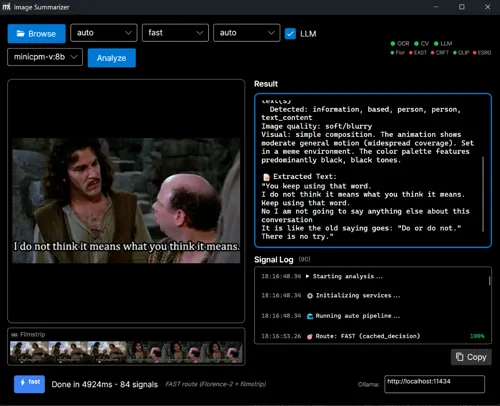
दृश्य अन्वेषण के लिए डेस्कटॉप अनुप्रयोग प्रदान करता है
डेस्कटॉप जीयूआई ने वास्तुकला को दृश्यात्मक रूप से प्रदर्शित किया है।
सीएलआई सभी जटिलता को सरल विकल्पों के रूप में प्रदर्शित करता है
| भाग | पैटर्न | ImageSummarizer क्रियान्वयन | ||
|---|---|---|---|---|
| 1 | अवरोधित अस्पष्टता | ColorWave तथ्यों को संगणित करता है | ||
| 2 | प्रतिबंधित अस्पष्ट मोएम विश्लेषण संदर्भ में कई तरंग प्रकाशित करें | |||
| 3 | संदर्भ खींचना ImageLedger प्रमुख विशेषताओं को संचित करता है |
समान नमूने. भिन्न डोमेन संभाव्यता प्रस्ताव करता है.
यह तेजी से रास्ता नहीं है।
| असफल मोड | क्या होता है | |||||||||||
|---|---|---|---|---|---|---|---|---|---|---|---|---|
| शोरपूर्ण GIF | फ्रेम जिटर, कम्पेशन आर्टिफैक्ट्स | अस्थायी स्थिरीकरण | + | एसआईएम डुप्लिकेट | МSK4 | मतदान एकमत | मस्क5 | पाठ | एमSK6 | केवल स्ट्रिप एक्सटेक्शन | ||
| ओसीआर रद्दी को लौटाता है | टेसरेक्ट शैलीकृत फ़ॉन्टों पर असफल होता है | वर्तनी | - | जांच गेट पता लगाता है \ < | МSK4 | सही | → | फ्लोरेंस तक बढ़ जाता है | एमSK6 | {\displaystyle \→} यदि अभी भी खराब है तो दृश्य एलएलएम | ||
| उच्च API लागत Too many cloud Vision LLM calls | Florence-2\ONNX handles | |||||||||||
| दृष्टि भ्रम | एलएलएम दावा पाठ है कि वहाँ नहीं है, जो नहीं है।vision.llm.text विपरीत content.text_likeliness |
|||||||||||
| समय के साथ पाइपलाइन परिवर्तन | नई तरंगें जोड़ी गईं, सीमाएं समायोजित की गयीं | अंतर्वस्तु | ||||||||||
| नमूना कुछ नहीं लौटाता | विज़न एलएलएम समय समाप्ति या खाली प्रतिक्रिया |
हर विफल मोड में एक निर्णायक प्रतिक्रिया होती है
महत्वपूर्ण संदर्भ: ImageSummarizer है छवि आgestion पाइपलाइन LucidRAG पारिस्थितिकी के लिए
इस लेख में छवि से संरचनात्मक संकेतों को निकालने पर ध्यान दिया जाता है
जब साथ जुड़ा है LucidRAG इन तीन पाइपलाइनों से multi-मोडल ग्राफ RAG:
Document → DocSummarizer → Structured signals
    ↓
Images → ImageSummarizer → Structured signals
    ↓
Data → DataSummarizer → Structured signals
    ↓
    ↓ (all signals)
    ↓
LucidRAG Graph Builder → Multi-modal knowledge graph
    ↓
Query → Multi-modal retrieval + constrained generation
यह क्यों महत्वपूर्ण है: पारंपरिक RAG छवियों को अपारदर्शी ब्लाब के रूप में देखता है जो शीर्षक प्राप्त करता है प्रथम- वर्ग संकेत स्रोत टेक्स्ट से टाइप किए हुए संबंधों के साथ
पैटर्न स्केल: यदि आप छवियों से संरचनात्मक संकेत निकाल सकते हैंडॉक-सममैरिजर), और डेटाडेटा-सममारीजरNameआप एक ज्ञान ग्राफ बना सकते हैं जहां प्रत्येक नोड provenance लेता है और हर किनारे का विश्वास प्राप्तांक है
शीघ्र आ रहा हैयह दिखाता है कि कैसे ये पाइपलाइनों को बहुविध रूप में निर्मित किया जाता है।
वास्तुकला की संरचना है: प्रत्येक तरंग स्वतंत्र होता है , प्रत्येक संकेत टाइप किया जाता है।
आरंभिक लेख प्रकाशन के बाद से यह प्रणाली काफी विकसित हुई है
केवल ओसीआर पाइपलाइनएमएसके0अपने तीनों के साथएम एसके1तह स्काल्सन,एम एस सीके2मल्टी,एमएस सीके3फ्रेम voting,एम ایس सीके4फिलिप ट्रिप ऑप्टिमेशन,एम इस् सीके5 और पाठ,M इस् सिके6 केवल स्ट्रिप एक्सटेक्शन,M एस सी के7वही अपनी विस्तृत अनुच्छेद की गारंटी देने के लिए काफी जटिल हो गया है। दृश्य ओसीआर एकीकृत पूर्ण तकनीकी विच्छेदन के लिए मार्गदर्शन
यदि आप इसे छवियों के लिए कर सकते हैं—सहीतर इनपुट क़िस्म के लिए यह कर सकते है,ओसीआर शोर से,शैलीकृत फ़ॉन्टों के साथ,आनिमेटेड फ्रेमों के लिए, और भ्रमण के लिए
कि'प्रक्रिया में संकीर्ण अस्पष्टता
| भाग | पैटर्न | |
|---|---|---|
| 1 | अवरोधित अस्पष्टता एकल घटक | |
| 2 | प्रतिबंधित अस्पष्ट मोएम बहुआयामी अवयव | |
| 3 | संदर्भ खींचना समय | |
| 4 | छवि इंटेलिजेंस | तरंग वास्तुकला |
| 4.1 | तीन--Tier OCR पाइपलाइन OCR |
अगलाभाग 5 दिखाएगा कि कैसे ImageSummarizer डॉक-सममैरिजर, और डेटा-सममारीजरName LucidRAG के साथ multi-मोडल ग्राफ RAG में सम्मिलित करें
सभी भाग एक ही अपरिवर्ती का अनुसरण करते हैं संभाव्यात्मक घटक प्रस्तावित.

© 2026 Scott Galloway — Unlicense — All content and source code on this site is free to use, copy, modify, and sell.

