


मैंने StyloFlow बनाया क्योंकि मैं लिख रहा था एक ही नमूना बार-बारcomponents that react to what happened before, emit confidence scores, and sometimes need to escalate to more expensive analysis. Existing workflow engines wanted me to think in terms of DAGs or state machines
नोट: StyloFlow अभी भी एक तैयार उत्पाद नहीं है ; क्योंकि मैं lucidRAG और StyloBot बनाता हूँ IM SK2 मैं अनुपस्थित सुविधाओं को जोड़ रहा हूँ और दोनों StyloBllow और अल्पकालिक पर API को पल्सिंग करता हूँ . यहMSSK4 अभी भी सक्रिय विकास में है।
स्टिलियोफ्लो एक संकेत---प्रचालित वाद्य मंडली लाइब्रेरी है जो मेल खाता है मेरा विचार के बारे में एआई पाइपलाइन: components declare what they produce and what they need, confidence scores guide execution, and cheap operations run first with escalation to expensive ones only when needed
यह मूल संरचना ऊर्जा है सुदृढ़आरएजी - एक क्रॉस-मोडल ग्राफ RAG उपकरण जो संयोजन करता है डॉक-सममैरिजर दस्तावेज डेटा-सममारीजरName (संरचनात्मक डेटा ImageSummarizerComment एक एकीकृत प्रश्न में (images)के साथ ज्ञान ग्राफ विजुअलाइज़ेशन के साथ संवर्धन प्रणाली स्टाइलोबोट (एक उन्नत बॉट संरक्षण प्रणाली) और कार्यान्वित करता है कम RAG पैटर्न
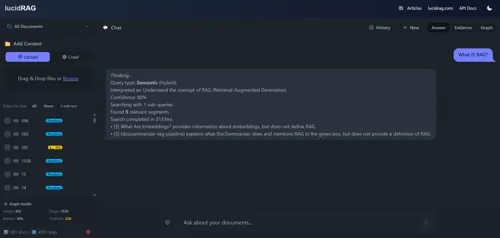
स्रोत: GitHub - StyloFlow
स्टिलियोफ्लो एक संकेत के कार्यशील प्रारूप है API और आकार विकसित होगा जैसे कि मैं lucidRAG और Stylobot बनाता हूँ, लेकिन यहाँ वर्णन किया गया निष्पादन अर्थ और पैटर्न बिन्दु के रूप में संकेतों के रूप मे पहला है।
यह एक नया DSL या कार्यप्रवाह भाषा नहीं है निष्पादन अर्थशास्त्र संकेतों के चारों ओर बनाया गया।
यहाँ क्या अधिकतर कार्यप्रवाह इंजनों की तरह दिखता है
// ❌ Traditional: Hardcoded dependencies
public async Task ProcessDocumentAsync(string path)
{
    var text = await ExtractTextAsync(path);
    var chunks = await ChunkTextAsync(text);
    var embeddings = await GenerateEmbeddingsAsync(chunks);
    var entities = await ExtractEntitiesAsync(chunks);
    await StoreEverythingAsync(embeddings, entities);
}
यह तब तक काम करता है जब तक
आप या तो के साथ समाप्त हो जाता है
स्टिलियोफ्लो पर निर्माण करता है mostlylucid. - सीमाबद्ध के लिए एक लाइब्रेरी
What ephemeral provides की त्वरित सारांश
// Bounded concurrent processing with full visibility
var coordinator = new EphemeralWorkCoordinator<DocumentJob>(
    async (job, operation, ct) => {
        await ProcessAsync(job, ct);
        operation.Signal("document.processed");
    },
    new EphemeralOptions { MaxConcurrency = 4 });

// Enqueue work
await coordinator.EnqueueAsync(new DocumentJob(filePath));

// Full observability
Console.WriteLine($"Active: {coordinator.ActiveCount}");
Console.WriteLine($"Completed: {coordinator.TotalCompleted}");
अल्पावधि से मुख्य लाभ
अधिक जानकारी के लिए-, देखें आग और Don't Quite Forget.
इस वादन मॉडल के साथ अल्पकालिक विस्तार करता है
यहाँ मुख्य वास्तुकला परिवर्तन है
graph TD
    subgraph Traditional["❌ Traditional: Hardcoded"]
        T1[Component A] -->|calls| T2[Component B]
        T2 -->|calls| T3[Component C]
        T3 -->|calls| T4[Component D]
    end

    subgraph StyloFlow["✅ StyloFlow: Signal-Driven"]
        S1[Component A]
        S2[Component B]
        S3[Component C]
        S4[Component D]
        SS[Signal Sink]

        S1 -.emits.-> SS
        S2 -.emits.-> SS
        S3 -.emits.-> SS
        SS -.triggers.-> S2
        SS -.triggers.-> S3
        SS -.triggers.-> S4
    end

    style T1 stroke:#ff6b6b
    style T2 stroke:#ff6b6b
    style T3 stroke:#ff6b6b
    style T4 stroke:#ff6b6b
    style S1 stroke:#51cf66
    style S2 stroke:#51cf66
    style S3 stroke:#51cf66
    style S4 stroke:#51cf66
    style SS stroke:#339af0
घटक एक-दूसरे को कभी नहीं बुलाते
संकेत क्या हुआ के बारे में तथ्य हैंकमांड या घटना नहीं हैं।
public record Signal
{
    public required string Key { get; init; }           // "document.chunked"
    public object? Value { get; init; }                 // Optional payload
    public double Confidence { get; init; } = 1.0;      // 0.0 to 1.0
    public required string Source { get; init; }        // Which component
    public DateTime Timestamp { get; init; }
    public Dictionary<string, object>? Metadata { get; init; }
}
महत्वपूर्ण वास्तुकला बिन्दु
सिग्नल सिंक सभी आपरेशनों में सभी समन्वयकों पर एक क्वेरी योग्य दृश्य उपलब्ध कराता है जो इसे साझा करता है
// Create a shared signal sink (no parameters, signals persist)
var sink = new SignalSink();

// Coordinators manage operation lifetime, NOT signal lifetime
var coordinator = new EphemeralWorkCoordinator<string>(
    ProcessAsync,
    new EphemeralOptions
    {
        MaxConcurrency = 8,
        MaxTrackedOperations = 100,         // Operations evict after this
        MaxOperationLifetime = TimeSpan.FromMinutes(5),  // Or after this time
        Signals = sink                      // Share the persistent view
    });

// Operations emit via their emitter
public async Task ProcessAsync(string docId, SignalEmitter emitter, CancellationToken ct)
{
    // Store actual data externally (cache, database, blob storage)
    await cache.SetAsync($"doc-{docId}", documentData);

    // Signal carries a REFERENCE, not the data
    emitter.Emit("document.chunked", key: docId); // Key references external data
}

// SignalSink is readonly - it cannot alter signals
// Signals persist until their operation evicts from the coordinator
सिग्नल सिंक दो समन्वय पैटर्न प्रदान करता है
आधार पर 1. Push
// Subscribe to the sink for push notifications
sink.Subscribe(signal => {
    if (signal.Is("document.chunked"))
    {
        // React immediately - signal includes OperationId
        Console.WriteLine($"Op {signal.OperationId} chunked doc at {signal.Timestamp}");
    }
});

// Returns IDisposable for cleanup
using var subscription = sink.Subscribe(HandleSignal);
आधार पर 2. Pull
// Get all signals for a specific operation
var opSignals = sink.GetOpSignals(operationId);

// Detect if any operation has emitted a signal
if (sink.Detect("embeddings.generated"))
{
    // At least one operation has generated embeddings
}

// Sense all signals matching a condition
var recentErrors = sink.Sense(s =>
    s.Signal.StartsWith("error.") &&
    s.Timestamp > DateTimeOffset.UtcNow.AddMinutes(-5)
);

// Get operation summary from its signal history
var summary = sink.GetOp(operationId);
Console.WriteLine($"Operation ran for {summary?.Duration}");
यह क्यों महत्वपूर्ण है
प्रमुख डिजाइन सिद्धांत बड़े डेटा को भंडारित करें (documents, imagesM SK2 vectorsMSC3 in caches or databases . Signals only carry references like "cache://doc-123" या संचालन कुंजियाँ
उदाहरण समन्वय
// Operation emits signal via ISignalEmitter interface
public async Task ProcessAsync(Item item, ISignalEmitter emitter, CancellationToken ct)
{
    // Emit to the sink
    emitter.Emit("processing.started");

    await DoWorkAsync(item, ct);

    emitter.Emit("processing.completed");
}

// Wave checks if it should run by querying sink
public bool ShouldRun(string path, AnalysisContext ctx)
{
    // Pull pattern: query the sink via context
    return ctx.Detect("document.chunked");
}

// UI subscribes to sink for reactive updates
sink.Subscribe(signal => {
    if (signal.Signal.StartsWith("document."))
    {
        // Push pattern: react immediately
        UpdateProgressUI(signal);
    }
});
उत्तेजना दो स्तरों पर होती है
// Pattern 1: Intra-coordinator escalation (wave checks signals)
public bool ShouldRun(string path, AnalysisContext ctx)
{
    var quality = ctx.GetSignal("quality.score");
    return quality?.Confidence < 0.7; // Only run if quality is low
}

// Pattern 2: Inter-coordinator escalation (atom routes to another coordinator)
// Option A: Explicit escalation signal
typed.Raise("escalate.to.expensive", payload, key: "doc-123");

// Option B: EscalatorAtom examines signals and decides
new EscalatorAtomOptions<T> {
    ShouldEscalate = evt => evt.Payload.Confidence < 0.7
}
कई समन्वयक स्वतंत्र रूप से चलाते हैं
इसके पीछे सिद्धांत के लिए देखें प्रतिबंधित अस्पष्ट संदर्भ खींचना.
महत्वपूर्ण: संकेत समन्वय घटनाएँ हैं।
// ❌ BAD: Carrying data in signals (memory pressure, boxing)
var imageBytes = await ProcessImageAsync(input);
emitter.Emit("image.processed", metadata: new { Data = imageBytes });

// ✅ GOOD: Store externally, signal the reference
var imageBytes = await ProcessImageAsync(input);
var cacheKey = $"processed/{docId}";
await cache.SetAsync(cacheKey, imageBytes);
emitter.Emit("image.processed", key: cacheKey);

// Later: Retrieve when needed
if (sink.Detect("image.processed"))
{
    var signals = sink.GetOpSignals(operationId);
    var imageKey = signals.FirstOrDefault(s => s.Signal == "image.processed")?.Key;
    if (imageKey != null)
    {
        var bytes = await cache.GetAsync<byte[]>(imageKey);
    }
}
सर्वोत्तम प्रथाएं
"cache://key", "blob://container/file", "db://table/id"घोषणा पत्रों में संविदाएं घोषित की जाती हैं। कार्यान्वयन से अलग. यह पृथक्ता मौजूद है इसलिए आप कोड पढ़ने के बिना कार्यप्रवाह को समझ सकते हैं
name: BotDetector
priority: 10              # Lower runs first
enabled: true

# What kind of component is this?
taxonomy:
  kind: analyzer          # sensor|analyzer|proposer|gatekeeper
  determinism: probabilistic
  persistence: ephemeral

# When should this run?
triggers:
  requires:
    - signal: http.request.received
      condition: exists

# What does it produce?
emits:
  on_complete:
    - key: bot.detected
      confidence_range: [0.0, 1.0]

  conditional:
    - key: bot.escalation.needed
      when: confidence < 0.7

# Resource limits
lane:
  name: fast              # fast|normal|slow|llm
  max_concurrency: 8

budget:
  max_duration: 100ms

# Configuration values
defaults:
  confidence:
    bot_detected: 0.6
  timing:
    timeout_ms: 100
लाभ
जबकि आप YAML मैनिस्ट्रेट हाथ से लिख सकते हैं, स्टिलियोफ्लो में एक दृश्य कार्यप्रवाह बिल्डर शामिल है जो आपको मॉड्यूलर का उपयोग करके संकेत डिजाइन करता है
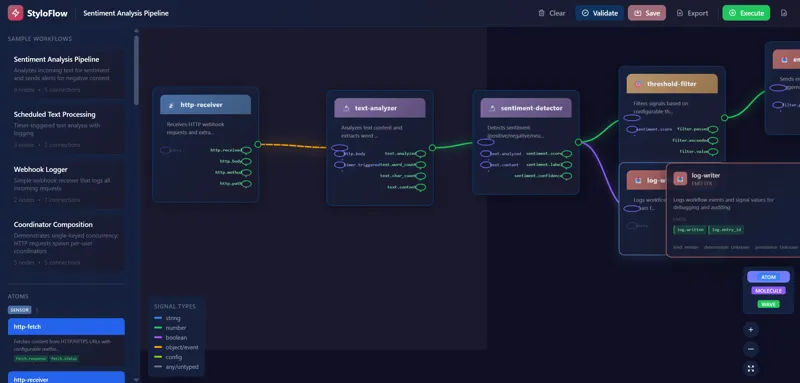
यूआई प्रदान करता है
यह विभिन्न कार्यप्रवाह आकारों के साथ प्रयोग करने में आसान बनाता है YAML को हाथ से लिखने के बिना जबकि अभी भी आपको उत्पन्न कॉन्फ़िगरेशन पर पूरा नियंत्रण देता है
एक तरंग एक समायोजित विश्लेषण चरण है यह अंतरफलक मौजूद है कि हम "के लिए हम चलाना चाहेंगे ?" एक पहला -वर्ग निर्णय बना, एक क्रियान्वयन विवरण शर्तात्मक तर्क में दफित नहीं है
public interface IContentAnalysisWave
{
    string Name { get; }
    int Priority { get; }               // Higher runs first
    bool Enabled { get; set; }

    // Quick filter - avoid expensive work
    bool ShouldRun(string contentPath, AnalysisContext context);

    // Do the analysis
    Task<IEnumerable<Signal>> AnalyzeAsync(
        string contentPath,
        AnalysisContext context,
        CancellationToken ct);
}
सरल तरंग उदाहरण:
public class FileTypeWave : IContentAnalysisWave
{
    public string Name => "FileType";
    public int Priority => 100;
    public bool Enabled { get; set; } = true;

    public bool ShouldRun(string path, AnalysisContext ctx)
    {
        // Skip if we already know the type
        return ctx.GetSignal("file.type") == null;
    }

    public async Task<IEnumerable<Signal>> AnalyzeAsync(
        string path,
        AnalysisContext ctx,
        CancellationToken ct)
    {
        var extension = Path.GetExtension(path);
        var mimeType = GetMimeType(extension);

        return new[]
        {
            new Signal
            {
                Key = "file.type",
                Value = mimeType,
                Confidence = 1.0,
                Source = Name
            }
        };
    }
}
तरंग समन्वय
WaveCoordinator प्राथमिकता क्रम में तरंग चलाता है
var coordinator = new WaveCoordinator(waves, profile);
var context = new AnalysisContext();

var results = await coordinator.ExecuteAsync(filePath, context, ct);

// All signals from all waves
foreach (var signal in context.GetAllSignals())
{
    Console.WriteLine($"{signal.Key}: {signal.Value}");
}
प्रतिद्वंद्वी पथ
विभिन्न समवर्ती सीमाओं के साथ लाइनों में तरंग चलाते हैं
| लेन | उद्देश्य | प्रतिद्वंद्व | |||
|---|---|---|---|---|---|
fast त्वरित जांचें |
|||||
normal मानक प्रसंस्करण |
|||||
io |
I/O bound (file readsM SK3 API calls | ||||
llm |
महंगे एलएलएम कॉल्स |
इससे किफायती प्रक्रियाओं को रोकने से बचा जाता है
यह पूरा चित्र है
graph TB
    subgraph Input["Input Layer"]
        REQ[HTTP Request]
        FILE[File Upload]
        JOB[Background Job]
    end

    subgraph Ephemeral["Ephemeral Layer"]
        COORD[Work Coordinator]
        OPS[Operations<br/>own signals]
        SINK[SignalSink<br/>read-only view]
    end

    subgraph StyloFlow["StyloFlow Layer"]
        MAN[Manifests]
        WAVE[Wave Coordinator]
        ATOMS[Atoms<br/>own signals]
    end

    subgraph Execution["Execution"]
        FAST[Fast Lane]
        NORM[Normal Lane]
        LLM[LLM Lane]
    end

    subgraph Output["Output"]
        RES[Results]
        ESCAL[Escalation]
        STORE[Persistence]
    end

    REQ --> COORD
    FILE --> COORD
    JOB --> COORD

    COORD --> OPS
    SINK -.queries.-> OPS

    WAVE -.reads.-> SINK
    MAN -.configures.-> WAVE
    WAVE --> ATOMS

    ATOMS --> FAST
    ATOMS --> NORM
    ATOMS --> LLM

    SINK -.queries.-> FAST
    SINK -.queries.-> NORM
    SINK -.queries.-> LLM

    SINK -.read for.-> RES
    SINK -.read for.-> ESCAL
    SINK -.read for.-> STORE

    style COORD stroke:#339af0
    style SINK stroke:#339af0
    style WAVE stroke:#51cf66
    style ATOMS stroke:#51cf66
प्रवाह
स्वामित्व मॉडल प्रत्येक ऑपरेशन /आटोम अपने संकेतों का स्वामित्व रखता है | . | SignalSink सभी ऑपरेशनों में सिर्फ पढ़ने के लिए |- | दृश्य उपलब्ध कराता है
वर्तमान निष्पादन मॉडल एकल-प्रक्रिया
भावी निष्पादन मॉडल मशीनों के बीच वितरित लेन संकेत स्थिर सीमा बना रहे हैं ownership model does not change
प्रक्रिया क्रियान्वयन में सेंटिक्स को वैध करता है
चलो 's कैसे देखो सुस्पष्टRAG StyloFlow का उपयोग करता है
चरण 1: प्रारंभिक पता लगाना
public class FileTypeDetectorWave : IContentAnalysisWave
{
    public int Priority => 100;  // Run first

    public async Task<IEnumerable<Signal>> AnalyzeAsync(...)
    {
        var extension = Path.GetExtension(path);

        return new[]
        {
            new Signal
            {
                Key = "file.extension",
                Value = extension,
                Source = "FileTypeDetector"
            }
        };
    }
}
स्टेज 2: ध्वनिबद्धता | ( | फ़ाइल द्वारा ट्रिगर किया गया
// In manifest:
// triggers:
//   requires:
//     - signal: file.extension
//       condition: in
//       value: [".pdf", ".docx", ".md"]

public class ChunkingWave : ConfiguredComponentBase, IContentAnalysisWave
{
    public int Priority => 80;

    public async Task<IEnumerable<Signal>> AnalyzeAsync(...)
    {
        var chunks = await ChunkDocumentAsync(path);

        ctx.SetCached("chunks", chunks);  // Share with other waves

        return new[]
        {
            new Signal
            {
                Key = "document.chunked",
                Value = chunks.Count,
                Source = Name
            }
        };
    }
}
स्टेज 3: सम्मिलन | ( | दस्तावेज़ द्वारा ट्रिगर किया गया
public class EmbeddingWave : ConfiguredComponentBase, IContentAnalysisWave
{
    public int Priority => 60;

    public bool ShouldRun(string path, AnalysisContext ctx)
    {
        // Only run if chunking succeeded
        return ctx.GetSignal("document.chunked") != null;
    }

    public async Task<IEnumerable<Signal>> AnalyzeAsync(...)
    {
        var chunks = ctx.GetCached<List<Chunk>>("chunks");
        var embeddings = await GenerateEmbeddingsAsync(chunks);

        ctx.SetCached("embeddings", embeddings);

        return new[]
        {
            new Signal
            {
                Key = "embeddings.generated",
                Value = embeddings.Count,
                Source = Name
            }
        };
    }
}
चरण 4: इकाई निष्कर्षण | ( | एम्बेडिंग के साथ समान |)
public class EntityExtractionWave : ConfiguredComponentBase, IContentAnalysisWave
{
    public int Priority => 60;  // Same as embedding - runs in parallel

    public async Task<IEnumerable<Signal>> AnalyzeAsync(...)
    {
        var chunks = ctx.GetCached<List<Chunk>>("chunks");

        // Use deterministic IDF scoring, not LLM per chunk
        // (See Reduced RAG pattern)
        var entities = await ExtractEntitiesAsync(chunks);

        return new[]
        {
            new Signal
            {
                Key = "entities.extracted",
                Value = entities.Count,
                Confidence = CalculateConfidence(entities),
                Source = Name
            }
        };
    }
}
स्टेज 5: गुणवत्ता जांच
public class QualityCheckWave : ConfiguredComponentBase, IContentAnalysisWave
{
    public int Priority => 40;  // After embedding + entities

    public async Task<IEnumerable<Signal>> AnalyzeAsync(...)
    {
        var embeddingSignal = ctx.GetSignal("embeddings.generated");
        var entitySignal = ctx.GetSignal("entities.extracted");

        var embeddingCount = (int)embeddingSignal.Value;
        var entityConfidence = entitySignal.Confidence;

        var quality = CalculateQuality(embeddingCount, entityConfidence);

        var signals = new List<Signal>
        {
            new Signal
            {
                Key = "quality.score",
                Value = quality,
                Source = Name
            }
        };

        // Trigger escalation if quality is poor
        if (quality < GetParam<double>("quality_threshold", 0.7))
        {
            signals.Add(new Signal
            {
                Key = "escalation.needed",
                Value = "low_quality_document",
                Source = Name
            });
        }

        return signals;
    }
}
इस दृष्टिकोण के लाभ
यह है कम RAG क्रिया में पैटर्न
स्टाइलोबोट एक उन्नत बोट पहचान प्रणाली है जो बहुविध खतरे विश्लेषण के लिए StyloFlow का उपयोग करता है
पैटर्न 1:
एक संकेत कई तरंगों को ट्रिगर करता है
graph LR
    S1[document.uploaded] --> W1[ChunkingWave]
    S1 --> W2[MetadataWave]
    S1 --> W3[LanguageDetectionWave]

    W1 -.signal.-> S2[document.chunked]
    W2 -.signal.-> S3[metadata.extracted]
    W3 -.signal.-> S4[language.detected]

    style S1 stroke:#339af0
    style S2 stroke:#339af0
    style S3 stroke:#339af0
    style S4 stroke:#339af0
    style W1 stroke:#51cf66
    style W2 stroke:#51cf66
    style W3 stroke:#51cf66
पैटर्न 2: अनुक्रमिक निर्भरता
पिछले संकेतों के लिए तरंग प्रतीक्षा करते हैं
graph LR
    W1[ExtractWave] -.signal.-> S1[text.extracted]
    S1 --> W2[ChunkWave]
    W2 -.signal.-> S2[text.chunked]
    S2 --> W3[EmbedWave]
    W3 -.signal.-> S3[embeddings.generated]

    style S1 stroke:#339af0
    style S2 stroke:#339af0
    style S3 stroke:#339af0
    style W1 stroke:#51cf66
    style W2 stroke:#51cf66
    style W3 stroke:#51cf66
पैटर्न 3: निबंधित शाखा
संकेतों के आधार पर विभिन्न तरंग चलाते हैं
graph TD
    W1[DetectorWave] -.signal.-> S1{confidence}

    S1 -->|< 0.4| W2[RejectWave]
    S1 -->|0.4-0.7| W3[EscalateWave]
    S1 -->|> 0.7| W4[AcceptWave]

    W2 -.signal.-> S2[rejected]
    W3 -.signal.-> S3[escalated]
    W4 -.signal.-> S4[accepted]

    style S1 stroke:#ffd43b
    style S2 stroke:#ff6b6b
    style S3 stroke:#ff922b
    style S4 stroke:#51cf66
    style W1 stroke:#339af0
    style W2 stroke:#ff6b6b
    style W3 stroke:#ff922b
    style W4 stroke:#51cf66
पैटर्न 4: आकलन
कई संकेत एक तरंग ट्रिगर करते हैं
graph LR
    W1[Wave A] -.signal.-> S1[a.complete]
    W2[Wave B] -.signal.-> S2[b.complete]
    W3[Wave C] -.signal.-> S3[c.complete]

    S1 --> T{All Ready?}
    S2 --> T
    S3 --> T

    T -->|Yes| W4[AggregatorWave]
    W4 -.signal.-> S4[aggregation.complete]

    style S1 stroke:#339af0
    style S2 stroke:#339af0
    style S3 stroke:#339af0
    style S4 stroke:#51cf66
    style T stroke:#ffd43b
    style W4 stroke:#51cf66
स्टिलोफ्लो दो स्तरों पर वृद्धि को समर्थन करता है
lucidRAG से उदाहरण: सबसे पहले तेजी से इकाई निष्कर्षण चलाता है।
यह एक त्वरित नहीं है।
संस्थापना
dotnet add package StyloFlow.Complete
संकल्पनागत प्रविष्टि बिंदु
// 1. Define a wave
public class MyAnalysisWave : IContentAnalysisWave
{
    public string Name => "MyAnalysis";
    public int Priority => 50;
    public bool Enabled { get; set; } = true;

    public bool ShouldRun(string path, AnalysisContext ctx) => true;

    public async Task<IEnumerable<Signal>> AnalyzeAsync(
        string path,
        AnalysisContext ctx,
        CancellationToken ct)
    {
        // Your analysis logic here
        var result = await AnalyzeAsync(path);

        return new[]
        {
            new Signal
            {
                Key = "my.signal",
                Value = result,
                Confidence = 1.0,
                Source = Name
            }
        };
    }
}

// 2. Register waves
var waves = new List<IContentAnalysisWave>
{
    new MyAnalysisWave(),
    new AnotherWave(),
};

// 3. Create coordinator
var coordinator = new WaveCoordinator(
    waves,
    CoordinatorProfile.Default);

// 4. Execute
var context = new AnalysisContext();
var results = await coordinator.ExecuteAsync(filePath, context);

// 5. Read signals
foreach (var signal in context.GetAllSignals())
{
    Console.WriteLine($"{signal.Key}: {signal.Value} ({signal.Confidence})");
}
घोषणाओं के साथ
// Load manifests from directory
var loader = new FileSystemManifestLoader("./manifests");
var manifests = await loader.LoadAllAsync();

// Build waves from manifests
var waves = manifests
    .Where(m => m.Enabled)
    .OrderBy(m => m.Priority)
    .Select(m => WaveFactory.Create(m))
    .ToList();

var coordinator = new WaveCoordinator(waves, profile);
पूर्ण उदाहरणों के लिए, देखें StyloFlow GitHub रिपोजिटरी.
StyloFlow के मुख्य विशेषताओं में से एक है कार्यप्रणाली खोजनीयता - आप पूरी पाइपलाइन सिर्फ घोषणाओं को पढ़ने के द्वारा समझ सकते हैं
यहाँ lucidRAG के लिए वास्तविक स्पष्ट निर्देशिका संरचना है
manifests/
├── 01-file-type-detector.yaml
├── 02-chunking.yaml
├── 03-embedding.yaml
├── 04-entity-extraction.yaml
├── 05-quality-check.yaml
└── 06-escalation.yaml
फ़ाइल
name: FileTypeDetector
priority: 100
enabled: true
description: Detects file type from extension

taxonomy:
  kind: sensor
  determinism: deterministic
  persistence: ephemeral

triggers:
  requires:
    - signal: document.uploaded
      condition: exists

emits:
  on_start:
    - file.detection.started
  on_complete:
    - key: file.extension
      type: string
      confidence_range: [1.0, 1.0]
    - key: file.mime_type
      type: string
      confidence_range: [1.0, 1.0]

lane:
  name: fast
  max_concurrency: 16

budget:
  max_duration: 10ms
02-chunking
name: ChunkingWave
priority: 80
enabled: true
description: Splits documents into semantic chunks

taxonomy:
  kind: extractor
  determinism: deterministic
  persistence: ephemeral

input:
  accepts:
    - document.pdf
    - document.docx
    - document.markdown
  required_signals:
    - file.extension

triggers:
  requires:
    - signal: file.extension
      condition: in
      value: [".pdf", ".docx", ".md", ".txt"]

emits:
  on_complete:
    - key: document.chunked
      type: integer
      confidence_range: [1.0, 1.0]
    - key: chunks.cached
      type: boolean

lane:
  name: normal
  max_concurrency: 8

budget:
  max_duration: 30s

defaults:
  chunking:
    max_chunk_size: 512
    overlap: 50
    respect_boundaries: true
03-embedding
name: EmbeddingWave
priority: 60
ires:
    - signal: file.extension
      condition: in
      value: [".pdf", ".docx", ".md", ".txt"]

emits:
  on_complete:
    - key: document.chunked
      type: integer
      confidence_range: [1.0, 1.0]
    - key: chunks.cached
      type: boolean

lane:
  name: normal
  max_concurrency: 8

budget:
  max_duration: 30s

defaults:
  chunking:
    max_chunk_size: 512
    overlap: 50
    respect_boundaries: true
03-embedding
name: EmbeddingWave
priority: 60
enabled: true
description: Generates ONNX embeddings for chunks

taxonomy:
  kind: embedder
  determinism: deterministic
  persistence: cached

input:
  required_signals:
    - document.chunked
    - chunks.cached

triggers:
  requires:
    - signal: document.chunked
      condition: ">"
      value: 0

emits:
  on_complete:
    - key: embeddings.generated
      type: integer
      confidence_range: [1.0, 1.0]

lane:
  name: normal
  max_concurrency: 4

budget:
  max_duration: 2m
  max_cost: 0.0  # Local ONNX model

defaults:
  embedding:
    model: all-MiniLM-L6-v2
    batch_size: 32
04-entityM SK1extraction .yaml:
name: EntityExtractionWave
priority: 60  # Same as embedding - runs in parallel
enabled: true
description: Extracts entities using IDF scoring

taxonomy:
  kind: extractor
  determinism: deterministic
  persistence: persisted

input:
  required_signals:
    - document.chunked

triggers:
  requires:
    - signal: document.chunked
      condition: ">"
      value: 0

emits:
  on_complete:
    - key: entities.extracted
      type: integer
      confidence_range: [0.0, 1.0]  # Confidence varies

lane:
  name: normal
  max_concurrency: 8

budget:
  max_duration: 1m

defaults:
  entity:
    min_idf_score: 2.5
    min_frequency: 2
    max_entities: 100
गुणवत्ता
name: QualityCheckWave
priority: 40
enabled: true
description: Validates extraction quality

taxonomy:
  kind: gatekeeper
  determinism: deterministic
  persistence: ephemeral

input:
  required_signals:
    - embeddings.generated
    - entities.extracted

triggers:
  requires:
    - signal: embeddings.generated
      condition: ">"
      value: 0
    - signal: entities.extracted
      condition: exists

emits:
  on_complete:
    - key: quality.score
      type: double
      confidence_range: [0.0, 1.0]

  conditional:
    - key: escalation.needed
      when: quality.score < 0.7

lane:
  name: fast
  max_concurrency: 16

defaults:
  quality:
    min_embeddings: 5
    min_entity_confidence: 0.5
    threshold: 0.7
06-escalation.yamlM SK2
name: EscalationWave
priority: 20
enabled: true
description: Improves low-quality extractions using LLM

taxonomy:
  kind: proposer
  determinism: probabilistic
  persistence: persisted

input:
  required_signals:
    - escalation.needed

triggers:
  requires:
    - signal: escalation.needed
      condition: exists
  skip_when:
    - signal: budget.exhausted

emits:
  on_complete:
    - key: escalation.complete
      type: boolean
    - key: entities.improved
      type: integer
      confidence_range: [0.7, 1.0]

lane:
  name: llm
  max_concurrency: 2  # Expensive

budget:
  max_duration: 30s
  max_tokens: 4000
  max_cost: 0.05

defaults:
  llm:
    model: gpt-4o-mini
    temperature: 0.1
    prompt_template: entity_extraction
इन फ़ाइलों को देखकर आप तुरंत जानते हैं
कोई कोड पढ़ने की आवश्यकता नहीं है कार्यप्रवाह स्वचालित है
जबकि ऊपर के उदाहरण पूर्ण रूप से घोषणात्मक YAML , तरंग दिखाते हैं भी हो सकता है कोड-आटोम आधारित घोषणापत्रों में संदर्भित
name: CustomAnalyzer
priority: 50
enabled: true
description: Custom analysis logic

# Reference a code-based atom implementation
implementation:
  assembly: MyProject.Analyzers
  type: MyProject.Analyzers.CustomAnalyzerWave
  method: AnalyzeAsync

# The manifest still declares the contract
taxonomy:
  kind: analyzer
  determinism: probabilistic

triggers:
  requires:
    - signal: data.ready

emits:
  on_complete:
    - key: analysis.complete
      confidence_range: [0.0, 1.0]

lane:
  name: normal
  max_concurrency: 4

# Configuration values passed to the atom
defaults:
  threshold: 0.75
  max_iterations: 10
क्रियान्वयन
public class CustomAnalyzerWave : ConfiguredComponentBase, IContentAnalysisWave
{
    public async Task<IEnumerable<Signal>> AnalyzeAsync(
        string path,
        AnalysisContext ctx,
        CancellationToken ct)
    {
        // Access manifest config
        var threshold = GetParam<double>("threshold", 0.75);
        var maxIterations = GetParam<int>("max_iterations", 10);

        // Custom logic here
        var result = await PerformComplexAnalysis(path, threshold, maxIterations);

        return new[]
        {
            new Signal
            {
                Key = "analysis.complete",
                Value = result.Score,
                Confidence = result.Confidence,
                Source = Name
            }
        };
    }
}
लाभ
यह हाइब्रिड दृष्टिकोण आपको घोषणात्मक कार्यप्रणाली खोज प्रदान करता है जबकि जटिल तर्क को बनाए रखने में सक्षम C#.
स्पष्ट संरचना दृश्यीकरण उत्पन्न करने के लिए शून्य बनाता है
graph TD
    DOC[document.uploaded] --> FT[FileTypeDetector<br/>Priority: 100<br/>Lane: fast]
    FT --> EXT[file.extension]

    EXT --> CH[ChunkingWave<br/>Priority: 80<br/>Lane: normal]
    CH --> CHUNKED[document.chunked]

    CHUNKED --> EMB[EmbeddingWave<br/>Priority: 60<br/>Lane: normal]
    CHUNKED --> ENT[EntityExtractionWave<br/>Priority: 60<br/>Lane: normal]

    EMB --> EMBGEN[embeddings.generated]
    ENT --> ENTEX[entities.extracted]

    EMBGEN --> QC[QualityCheckWave<br/>Priority: 40<br/>Lane: fast]
    ENTEX --> QC

    QC --> QSCORE[quality.score]
    QC -.conditional.-> ESC_NEED[escalation.needed]

    ESC_NEED -.-> ESC[EscalationWave<br/>Priority: 20<br/>Lane: llm]
    ESC --> ESC_DONE[escalation.complete]

    style DOC stroke:#339af0
    style FT stroke:#51cf66
    style CH stroke:#51cf66
    style EMB stroke:#51cf66
    style ENT stroke:#51cf66
    style QC stroke:#ffd43b
    style ESC stroke:#ff922b
यह चित्र YAML manifests से प्रोग्रामिंग रूप में उत्पन्न किया गया था - कोई मैनुअल ड्राइंग नहीं
StyloFlow का एक अप्रत्याशित गुण है कि यह एक सिस्टम बनाता है एलएलएम सुरक्षित के बारे में तर्क कर सकते हैं.
डिबगिंग या orchestration के लिए LLMs का उपयोग करने की अधिकतर कोशिशें विफल हैं क्योंकि वे dropped-in सिस्टम अपारदर्शी है
StyloFlow विपरीत करता है अपरिवर्तनीय तथ्य क्या हुआ जब और किस विश्वास के साथ
जो कोड LLMs को वास्तव में उपयोगी बनाता है — कर्ताओं के रूप में नहीं, बल्कि विश्लेषक.
StyloFlow में एक LLM कभी नहीं है
इसके बजाय, यह एक दिया जाता है सिग्नल सिंक दृश्य और सवाल पूछे जैसे
कोड के लिए उदाहरण इनपुट LLM:
{
  "operation": "doc-123",
  "signals": [
    { "key": "document.chunked", "value": 12, "confidence": 1.0, "source": "ChunkingWave" },
    { "key": "entities.extracted", "value": 4, "confidence": 0.42, "source": "EntityWave" },
    { "key": "quality.score", "value": 0.39, "source": "QualityCheckWave" },
    { "key": "escalation.needed", "source": "QualityCheckWave" }
  ]
}
That'is not a log stream तर्क आधार.
एक कोड एलएलएम अब कर सकता है
सभी के लिए विश्वास नहीं किया जाता करना कुछ भी
पारंपरिक "LLM त्रुटि सटीन करने के लिए प्रयास करता है
यह कोड और कुछ लॉग्स है
StyloFlow डिबगिंग सरल है:
"यहाँ observed सिस्टम की सही स्थिति है
क्योंकि संकेत अपरिवर्तनीय हैं और स्वामित्व के होते हैं
आप पहले से ही विश्वास कर रहे तथ्यों पर LLM कारण
यह केवल कठोर सीमाओं के कारण काम करता है
कोई फीडबैक लूप नहीं है जहां LLM "decides"the next stepM SK2MostlyMSC3it proposes explanations or configuration suggestions that a human (or deterministic policyMST5 may apply laterMSP6
यह असमानता जानबूझकर है
एक बार संकेतों, विश्वास, और परिणाम स्पष्ट हैं शक़्ति बाद में
इनमें से कोई भी LLM को सिस्टम चलाने की अनुमति नहीं देता
एलएलएम एक बन जाता है निदान लेंसएक नियंत्रण सतह नहीं है
स्टिलियोफ्लो केवल संभाव्यतावादी प्रणालियों को सुरक्षित नहीं करता है
यह उन्हें बनाता है बोधनीय मानव के लिए — परीक्षण के लिए , और LLMs के लिए बिना नियंत्रण छोड़े —
कि ''' के बीच अंतर है
उन मापों में से केवल एक
1. घोषणात्मक संरचना
अवयव अपनी संविदाएं घोषित करते हैं (ट्राइगर्स, सिग्नलों को,\बैजैट को\ ),\ उनकी निर्भरताओं को नहीं देता है\M SK4\ सिस्टम निष्पादन आदेश का पता लगाता है
2. डिफ़ॉल्ट से देखने योग्य
प्रत्येक क्रिया एक संकेत है।
अनुकूलित निष्पादन
विश्वास प्राप्तियां बिना स्पष्ट रूटिंग तर्क के शाखाओं को चलाती हैं।
4. माकिंग फ्रेमवर्क के बिना परीक्षण योग्य
मोक संकेतों, अवयव नहीं
var context = new AnalysisContext();
context.AddSignal(new Signal
{
    Key = "document.chunked",
    Value = 10,
    Confidence = 1.0,
    Source = "Test"
});

var wave = new EmbeddingWave();
var results = await wave.AnalyzeAsync(path, context, ct);

Assert.Single(results);
Assert.Equal("embeddings.generated", results.First().Key);
5. वृद्धिशील जटिलता
सरल प्रारंभ करें
var coordinator = new EphemeralWorkCoordinator<Job>(ProcessAsync);
आवश्यकता होने पर संकेत जोड़ें:
new EphemeralOptions { Signals = signalSink }
के लिए तरंग जोड़ें
var waveCoordinator = new WaveCoordinator(waves, profile);
घोषणात्मक कॉन्फ़िगरेशन के लिए परिपत्र जोड़ें:
name: MyWave
triggers: [...]
emits: [...]
यहाँ' पूर्ण है सुस्पष्टRAG पाइपलाइन पर एक नज़र (see the detailed code examples in the
document.uploaded संकेतfile.extension संकेतtext.extracted संकेतdocument.chunked संकेतembeddings.generated संकेतentities.extracted संकेतquality.score संकेतescalation.complete संकेतstorage.complete संकेतUI वास्तविक के लिए SignalSink पर सदस्यता लेता है
// Subscribe to sink for push notifications
signalSink.Subscribe(signal => {
    if (signal.Key.StartsWith("document."))
    {
        await _hub.Clients.User(userId)
            .SendAsync("DocumentProgress", new
            {
                stage = signal.Key,
                progress = CalculateProgress(signal),
                operationId = signal.OperationId
            });
    }
});
या यदि आप मतदान करना पसंद करते हैं तो खींच पैटर्न का उपयोग करें
// Query SignalSink for document progress (pull pattern)
var documentSignals = signalSink.GetSignals()
    .Where(s => s.Key.StartsWith("document.") &&
                s.Timestamp > lastCheck);

foreach (var signal in documentSignals)
{
    UpdateProgressUI(signal);
}
कुंजी बिंदु You subscribe to the SINK (which views all atoms), not to individual operations
यह कैसे है सुस्पष्टRAG एक एकीकृत संकेत के माध्यम से दस्तावेज़ों, आंकड़े, और छवियों को प्रक्रमित करता है डॉक-सममैरिजर, डेटा-सममारीजरName, और ImageSummarizerComment एक ऑरेक्स्ट्रेशन परत के नीचे
यहाँ' पूर्ण है स्टाइलोबोट पाइपलाइन पर एक नज़र (विशिष्ट कोड में देखें
bot.detected विश्वास के साथ संकेतbot.detected संकेतbot.detected संकेतप्रमुख लाभ
// ❌ Traditional: Every request gets expensive analysis
var reputation = await CheckIpAsync(ip);
var behavior = await AnalyzeBehaviorAsync(session);  // Even if IP is known bad
var llmScore = await LlmAnalysisAsync(conversation);  // Always expensive

// ✅ StyloFlow: Waves run based on confidence signals
// BehaviorAnalysis only runs if confidence is ambiguous (0.4-0.7)
// LLM analysis only runs if still unsure after behavior check
लागत विभाजन आईपी जांच लागत $0 और समय का चलता है & #44; 100%। $0.0001 विपरीत naive "LLM everything" पर $0.002 बचत
| विशेषता | स्टिलियोफ्लो | अस्थायी | एयरफ्लो | |||||||||||
|---|---|---|---|---|---|---|---|---|---|---|---|---|---|---|
| समन्वय सिग्नल | ||||||||||||||
| घोषणात्मक YAML मैनिस्ट्रेट | ✅ YaML मैनीस्ट्रेट | |||||||||||||
| शर्तात्मक | ✅ | संकेत ट्रिगर | 2 | 3 | अवस्थाएं | 4 | 5 | शाखा | 6 | 7 | विकल्प स्थिति | 8 | ||
| उत्तेजना | ✅ Built-in | |||||||||||||
| प्रेक्षणशीलता कार्यप्रणाली इतिहास | ||||||||||||||
| बजट नियंत्रण | ✅ टोकन | |||||||||||||
| स्थानीय निष्पादन प्रक्रिया में -में | ||||||||||||||
| प्रतियोगी मार्ग Pools | ❌ | सेवा सीमाएँ |
जहाँ यह मॉडल स्वाभाविक रूप से फिट करता है
जहाँ यह नहीं है
ये मॉडल के स्वाभाविक विस्तार हैं
जैसे-जैसे अर्थ स्थिर होता है lucidRAG और Stylobot विकास के माध्यम से इन पैटर्न व्यवहार्य हो जाते हैं
1. संकेतों से सीखना
ट्रैक जो एस्केलेशन पथ सबसे अच्छा काम करता है:
// Did the LLM escalation improve accuracy?
// Learn to skip it if behavioral analysis is sufficient
2. लागत अनुकूलन
ऐतिहासिक निष्पादन पर आधारित स्वचालित लेन आबंटन
// If a "slow" wave completes quickly, promote to "normal"
3. संकेत फिर से बजाएँ
संकेत अनुक्रमों को फिर से बजाकर डिबग करें:
var replay = SignalReplay.FromFile("trace.jsonl");
await coordinator.ReplayAsync(replay);
मेसिन समन्वयन
चिह्नों को केंद्रित रखते हुए मशीनों के बीच लेन वितरित करें
मुख्य अंतर्दृष्टि यह है अभियांत्रिकी प्रणालियों में प्रत्येक घटक का विश्वास है.
पारंपरिक कार्यप्रवाह सफलता मानते हैं
संकेत यह स्वाभाविक रूप से प्रदान करते हैं
// Multiple detectors vote
var signals = context.GetSignals("bot.detected");

// Aggregate by confidence
var verdict = signals
    .OrderByDescending(s => s.Confidence)
    .First();

// Or majority vote
var isBot = signals
    .Count(s => (bool)s.Value) > signals.Count() / 2;

// Or weighted average
var score = signals
    .Sum(s => (bool)s.Value ? s.Confidence : -s.Confidence)
    / signals.Count();
इसीलिए StyloFlow के लिए अच्छी तरह से काम करता है कम RAG प्रत्येक निष्कर्षण चरण एक विश्वास प्राप्तांक उत्पन्न करता है
निष्पादन मॉडल
संकेत क्यों महत्वपूर्ण हैं
कार्यान्वयन
संबंधित लेख:
स्रोत कोड: GitHub - StyloFlow
पारंपरिक कार्यप्रवाह इंजन आपको घोषणा करने के लिए पूछते हैं आगे क्या होता है. यह मॉडल घटकों से घोषणा करने के लिए पूछता है जो वे पैदा करते हैं और जो उन्हें चाहिएतब संकेतों को निष्पादन समन्वयित करता है
कुंजी स्विच संकेत वितरित करें, विश्वास गाइड्स, लेन सुरक्षा.
यह टाइमरल या एयरफ्लो पर स्टिलोफ्लो चुनने के बारे में नहीं है।
यदि आप AI निर्मित कर रहे हैं
तो ये निष्पादन अर्थशास्त्र आप सोचने के तरीके से फिट हो सकता है
अल्पकालीन लाइब्रेरी स्थिर आधार है।
प्रश्नों या प्रतिक्रिया के लिए, देखें जिटहब रिपोजिटरी.

© 2026 Scott Galloway — Unlicense — All content and source code on this site is free to use, copy, modify, and sell.
