


bot detection should not stop at allow

स्टिलियोबोट रिलेस शृंखला
- व्यवहार, पहचान नहीं: क्यों StyloBot ग्राहक व्यवहारिक रूप से मॉडल करता है
- व्यवहार-Aware ASP.NET UI: सर्वर-\ऐसे पता लगाने के परिणाम पर सतह दे दिया
- लंबे समय तक चलाने वाले नेट सेवाओं में असीमित विकास का पता लगाना और स्थिर करना: विश्वसनीयता अनुशासन जो उत्पादन में इंजन को नीरस बनाए रखता है
- व्यवहार-Aware TypeScript UI: Express , Fastify, और ब्राउज़र घटक
- साइडकार वास्तुकला: कैसे पता लगाने की इंजन गैर--.NET स्टाक से जुड़ता है
- तेजी से सीखनाअनुकूलन सीखने की प्रणाली
- उस चीज़ का परीक्षण जो सफल नहीं हो रही है: सत्यापन अनुशासन
- स्टिलियोएक्सट्रैक्ट - एक स्थानीय सीखने के HTML को मार्कडाउन रूपांतरक में: एचटीएमएल\→\मार्कडाउन परत जो डिटेक्टर के साथ जोड़ता है,\walker bug lucidVIEW पकड़ा\M SK3\ और कुत्तेfood लूप कि यह ईमानदार बना
स्टेलोबोट यूआई स्टेरोबोट पर ASP युक्त नेट सतह है।
अधिकतर UX प्रणालियां अंध हैं. वे सभी को एक ही पृष्ठ रेन्डर करते हैं
यह प्रविष्टि StyloBot जारी श्रृंखला में दूसरा प्रविष्टी है व्यवहार, पहचान नहीं सिस्टम के नीचे मॉडल को शामिल करता है
पता पहले से मौजूद है मान लीजिए
यह एपीएसपी को एक साफ सतह प्रदान करता है जो पता लगाने के परिणाम पर एक स्वच्छ सतही देता है ताकि रजोर दृश्य यंत्रयंत्रक यंत्रक 3 और पृष्ठ हैंडलर इसे सीधे उपयोग कर सकते हैं
इसीलिए तथ्य के बाद हिस्सों को बांधने की बजाय आप रेंडर समय पर अनुभव को आकार दे सकते हैं
- मूल्य UI छुपाएँयह लेख विशेष रूप से इस बारे में है कि ASP. नेट सतह: टैग मददगारोंM SK2 पृष्ठ व्यवहार, पहचान नहीं, जो इसके नीचे व्यवहार मॉडल का वर्णन करता है
यह क्या व्यवहार है। -\aware UI wild में दिखता है।

कि दाहिने हाथ क्लस्टर तीन टैग मददगार है<sb-badge>, <sb-confidence>, <sb-risk-pill>प्रति एक ही से पढ़ने के लिए ) अनुरोध पता लगाने का परिणाम नियंत्रक होगा
मूल विचार सरल है।
इसका मतलब है
अगर आप खोज इंजन कहानी चाहते हैं , जो पहले से ही में शामिल है भाग 2 और भाग 3. यह अनुच्छेद उस पर एक परत को आरंभ करता है कि
flowchart LR
    A[Incoming request] --> B[StyloBot middleware]
    B --> C[Risk score bot type and signals]
    C --> D[Tag helpers in Razor]
    C --> E[Controller and page policy]
    D --> F[Different rendered experience]
    E --> G[Allow block challenge or redirect]
UI सतह के बिना पता लगाना अवसंरचना में फंस जाता है
आप एक स्कोर लॉग कर सकते हैं
यही कारण है कि सतह महत्वपूर्ण है
कभी-कभी सही उत्तर एक ब्लॉक है
यह StyloBot UI में विभेदक है। तेजी से सीखना.)
इस लेख में एक नमूना ASP के माध्यम से चलता है। . NET Core MVC स्टोर फ्रंट जो छह पृष्ठों पर StyloBot UI सहायक का उपयोग करता है।
नमूना अनुप्रयोग जानबूझकर छोटा है।
पैकेजों को संस्थापित करें
dotnet add package Mostlylucid.BotDetection
dotnet add package Mostlylucid.BotDetection.UI
तो तार StyloBot में Program.cs:
builder.Services.AddStyloBot(
    configureDashboard: dashboard =>
    {
        dashboard.BasePath = "/_stylobot";
        dashboard.AllowUnauthenticatedAccess = true; // dev only
    },
    configureDetection: detection =>
    {
        detection.ExcludeLocalIpFromBroadcast = false;
    });

// ...

app.UseStyloBot();
app.MapHub<StyloBotDashboardHub>("/_stylobot/hub");
यह अनुरोध वर्गीकरण शुरू करने के लिए पर्याप्त है और परिणाम को Razor के सामने प्रदर्शित करना। भाग 3 यह अधिक विवरण में शामिल करता है.
लॉगिन पृष्ठ एक अच्छा माइक्रो है क्योंकि यह कुछ पंक्तियों में संपूर्ण मॉडल को दिखाता है
flowchart TD
    A[Request for login page] --> B[Render page]
    B --> C[Bot sees warning]
    B --> D[Form is rendered]
    D --> E[Submission arrives]
    E --> F{Honeypot triggered?}
    F -->|Yes| G[Redirect to LoginDenied]
    F -->|No| H{IsBot?}
    H -->|Yes| G
    H -->|No| I[Authenticate user]
<!-- Layer 1: bots see a deterrent message before the form -->
<sb-bot>
    <div class="alert alert-warning">Automated login attempts are detected and blocked.</div>
</sb-bot>

<form method="post" action="/Account/Login">
    <!-- Layer 2: hidden trap fields - humans leave them blank; bots fill everything -->
    <sb-honeypot prefix="hp" fields="2"></sb-honeypot>

    <input type="email" name="email" />
    <input type="password" name="password" />
    <button type="submit">Sign In</button>
</form>
// Layer 3: server-side final check before any processing
if (HoneypotValidator.IsTriggered(HttpContext) || HttpContext.IsBot())
    return RedirectToAction("LoginDenied");
बॉट एक चेतावनी देखता है, फिर यदि यह प्रस्तुत करता है तो मधुमक्खी को ट्रिप करता है।
इस पोस्ट का बाकी उस विचार को एक वास्तविक स्टोर फ्रंट पर विस्तारित करता है
मुख्य वाणिज्यिक समस्या अमूर्त रूप में नहीं है
मूल्य scrapers वे उत्पा दक नामों, मूल्यों , विवरणों, और स्टॉक डेटा का संग्रह करते हैं ताकि प्रतिस्पर्धी आप के खिलाफ लगभग वास्तविक समय में पुनरीक्षा कर सकें
Voucher testers. वे कूट खाली स्थानों को जब तक कि वे वैध कूट ढूंढने के लिए बाध्य कर रहे हैं कूट1 जो तबクーポン मंचों में पोस्ट किया जाता है और मार्जिन erode
प्रमाण पत्र पट्टी वे लीक उपयोक्ता नाम फिर से खेलते हैं
एआई प्रशिक्षण क्रूलर वे विवरणों को एकत्रित करते हैं, समीक्षाएँ, और मॉडल प्रशिक्षण के लिए संपादकीय प्रतिलिपि।
समाचार पत्र कटाने वाले वे ई-मेल पताों को सत्यापित करने के लिए साइनअप फार्म जांच करते हैं
ये एक ही समस्या नहीं हैं
Home page is where many scrapers start. They want the catalogue. You want the catalog usable for humans and indexable for search
परिदृश्य-:-एक मूल्य scraper Hits /यह एक तटस्थ विवरणिका संदेश देखता है
<!-- Human visitors see the welcome message and category count -->
<sb-human>
    <p class="muted">Welcome! Browse @Model.Count products.</p>
</sb-human>

<!-- Bots see a neutral, non-committal message -->
<sb-bot fallback="hide">
    <p class="muted">Product catalogue.</p>
</sb-bot>

<!-- Search engine crawlers get structured metadata, not price data -->
<sb-gate bot-type="SearchEngine">
    <meta name="description" content="@Model.Count products across @categories categories." />
</sb-gate>

<!-- Verified bots (Googlebot etc.) see a specific indicator -->
<sb-gate bot-type="VerifiedBot">
    <div class="alert alert-info">Verified crawler detected. Serving crawl-optimised view.</div>
</sb-gate>

<!-- High-risk sessions see friction before the buy buttons -->
<sb-gate min-risk="High">
    <div class="alert alert-warning">Additional verification may be required at checkout.</div>
</sb-gate>
यह संकेत रेंडर कर रहे हैं।
यह भी है जहाँ crawler भिन्नता का महत्व है. आप Googlebot अनुक्रमण उत्पादों को चाहते हैं. आप शायद हर स्वचालित ग्राहक को एक मानव खरीदार के समान वाणिज्यिक प्रस्तुतीकरण प्राप्त करने के लिए नहीं चाहते
उत्पाद विवरण पृष्ठ पर वाणिज्यिक उद्देश्य स्पष्ट हो जाता है।
परिदृश्य: एक मूल्य scraper पर गिरता है /Product/Detail/12यह कोई डिस्काउंट कोड नहीं देखता है
<!-- Exclusive discount - only shown to low-risk, verified human visitors -->
<sb-gate max-risk="Low">
    <div class="alert alert-success">
        Member discount: use code LOYAL10 for 10% off today.
    </div>
</sb-gate>

<!-- Medium-risk visitors get a friction signal before the cart button -->
<sb-gate min-risk="Medium">
    <div class="alert alert-warning">
        We noticed some unusual activity from your network.
        You can still purchase. You may be asked to verify at checkout.
    </div>
</sb-gate>

<!-- Datacenter/VPN visitors lose the buy button -->
<sb-signal signal="ip.is_datacenter" condition="true">
    <p class="muted">Purchase unavailable from datacenter or VPN networks.</p>
</sb-signal>

<!-- Human-only: the add-to-cart button -->
<sb-gate human-only>
    <form method="post" action="/Cart/Add">
        <button type="submit" class="btn btn-success">Add to Cart</button>
    </form>
</sb-gate>

<!-- Detection mini-card for transparency -->
<sb-summary variant="card"></sb-summary>
<sb-confidence display="bar" width="180px"></sb-confidence>
यहाँ तीन उपयोगी नमूने दिखाई देते हैं
निष्ठा लक्ष्यकरण अच्छे प्रस्ताव अच्छे सत्रों में जाने चाहिए।
प्रगतिशील friction मध्यम-खतरे का अर्थ स्वचालित रूप से नहीं होता है।
सिग्नल ip.is_datacenter एक कच्चा संकेत है।
अगर आप उन संकेतों के पीछे वास्तुकला चाहते हैं भाग 2 चरण पहचान पाइपलाइन को कवर करता है.
यह विभेद शेष नमूने के माध्यम से चलता है।
चेकआउट सबसे अधिक है।
परिदृश्य: एक वाउचर-testing bot hits /Cart/Checkoutयह एक मरे हुए को देखता है।
flowchart TD
    A[Visitor reaches checkout] --> B{Human?}
    B -->|No| C[Show dead-end message]
    B -->|Yes| D{Risk band}
    D -->|Low| E[Express checkout]
    D -->|Elevated| F[Standard payment flow]
    D -->|High or above| G[Alternative path]
    E --> H[POST order]
    F --> H
    G --> H
    H --> I{Honeypot triggered?}
    I -->|Yes| J[Silent accept fake success]
    I -->|No| K[Process real order]
<!-- Gate the entire checkout form on human-only detection -->
<sb-gate human-only>
    <form method="post" action="/Cart/Order">
        @Html.AntiForgeryToken()

        <!-- Honeypot trap fields - invisible to humans, irresistible to bots -->
        <sb-honeypot prefix="co" fields="2"></sb-honeypot>

        <!-- Express checkout only for trusted visitors -->
        <sb-gate max-risk="Low">
            <button type="submit" name="express" value="true" class="btn btn-success">
                Express Checkout
            </button>
        </sb-gate>

        <!-- Standard checkout available up to elevated risk -->
        <sb-gate max-risk="Elevated">
            <button type="submit" class="btn btn-primary">Proceed to Payment</button>
        </sb-gate>

        <!-- High-risk visitors get an alternative path -->
        <sb-gate min-risk="High">
            <p>Please call us to complete your order: 0800 123 456</p>
        </sb-gate>
    </form>
</sb-gate>

<!-- Bots see a dead end, not an error -->
<sb-bot>
    <p class="muted">Checkout is only available to human visitors.</p>
</sb-bot>
और नियंत्रक में
[HttpPost]
public IActionResult Order(OrderModel model)
{
    if (HoneypotValidator.IsTriggered(HttpContext))
    {
        // Silent accept - bot thinks the order succeeded
        return RedirectToAction("Confirmed");
    }

    return ProcessOrder(model);
}
इस पृष्ठ में तीन तकनीकें एक साथ काम करते हैं
हनीपोट डिस्कर्ड यदि एक बोट छुपे क्षेत्रों को भरता है तो आप मौन रूप से अनुरोध स्वीकार करते हैं और छोड़ देते हैं
जोखिम एक्सप्रैस चेकआउट एक न्यास लाभ है, एक डिफ़ॉल्ट अधिकार नहीं है
Graceful degradation एक सादा संदेश अक्सर एक कठिन त्रुटि से संचालनात्मक रूप में बेहतर होता है
लॉगिन एक भिन्न प्रकार का उच्च है।
Scenario: a credential-stuffing script hits /Account/Loginयह कभी भी रूप को नहीं देखता है LoginDenied.
<!-- High-risk sessions see friction before the form -->
<sb-gate min-risk="High">
    <div class="alert alert-danger">
        High-risk signals detected. Login attempts are logged and may be blocked.
    </div>
</sb-gate>

<!-- Bots see a deterrent message - but the form is still rendered below -->
<sb-bot>
    <div class="alert alert-warning">
        Automated login attempts are detected and blocked.
    </div>
</sb-bot>

<!-- Form is visible to everyone; the honeypot is the second layer -->
<form method="post" action="/Account/Login">
    @Html.AntiForgeryToken()
    <sb-honeypot prefix="hp" fields="2"></sb-honeypot>
    <div class="form-group">
        <label for="email">Email address</label>
        <input type="email" id="email" name="email" autocomplete="email" />
    </div>
    <div class="form-group">
        <label for="password">Password</label>
        <input type="password" id="password" name="password" autocomplete="current-password" />
    </div>
    <button type="submit" class="btn btn-primary">Sign In</button>
</form>
नियंत्रक अंतिम जांच प्रदान करता है
[HttpPost]
public IActionResult Login(LoginModel model)
{
    if (HoneypotValidator.IsTriggered(HttpContext))
        return RedirectToAction("LoginDenied");

    if (HttpContext.IsBot())
        return RedirectToAction("LoginDenied");

    return Authenticate(model);
}
कुंजी बिंदु लागत असमानता है।
समाचार पत्र पंजीकरण है जहां एआई क्रूलर प्रबंधन विशेष रूप से रोचक हो जाता है।
परिदृश्य: जीपीटीबीओट Hits /Newsletter/Subscribeयह एक डेटा को देखता है
ए. आई. क्रैलेटर उत्पाद खरीदने या कच्चे खाते बनाने की कोशिश नहीं कर रहे हैं।
<!-- Human pitch - only visible to real visitors -->
<sb-human>
    <p class="muted">
        Get exclusive deals and discount codes delivered to your inbox.
        Subscribe below. Unsubscribe any time.
    </p>
</sb-human>

<!-- AI crawlers get a licensing message, not a block -->
<sb-gate bot-type="AiBot">
    <div class="alert alert-info">
        This email subscription endpoint is for human readers.
        For data licensing enquiries please contact us directly.
    </div>
</sb-gate>

<!-- Other automated clients get a simpler message -->
<sb-bot>
    <sb-gate bot-type="AiBot" negate="true">
        <div class="alert alert-warning">
            Automated subscription attempts are discarded.
        </div>
    </sb-gate>
</sb-bot>

<!-- The form - visible to everyone, processed differently per visitor type -->
<div class="card">
    <form method="post" action="/Newsletter/Subscribe">
        @Html.AntiForgeryToken()
        <sb-honeypot prefix="nl" fields="3"></sb-honeypot>
        <div class="form-group">
            <label for="email">Your email address</label>
            <input type="email" id="email" name="email" autocomplete="email" />
        </div>
        <button type="submit" class="btn btn-success">Subscribe</button>
    </form>
</div>
और नियंत्रक में
[HttpPost]
public IActionResult Subscribe(string email)
{
    if (HoneypotValidator.IsTriggered(HttpContext) || HttpContext.IsBot())
    {
        // Silent accept: bot thinks it succeeded, no retry incentive
        return RedirectToAction("Thanks", new { real = false });
    }

    _mailingList.Subscribe(email);
    return RedirectToAction("Thanks", new { real = true });
}
Thanks दृश्य दोनों मामलों में समान हो सकता है
यह भी है जहाँ बॉट प्रकार सबसे अधिक महत्वपूर्ण है AiBot यह एक वर्गीकरण है जो व्यापार प्रतिक्रिया को उत्तेजित कर सकता है
/Me पृष्ठ विकासकर्ता है।
Scenario: एक विकासकर्ता ने अभी-अभी StyloBot का प्रयोग किया है और यह सत्यापित करना चाहता है कि ब्राउज़र सत्रों को मानव के रूप में स्कोर और कि curl bot के रूप में प्राप्तियों.
<!-- Full detection panel: confidence, risk, reasons, contributing detectors -->
<bot-detection-details collapsed="false"></bot-detection-details>

<!-- Individual components for custom layouts -->
<sb-badge variant="full"></sb-badge>
<sb-confidence display="both" width="100%"></sb-confidence>
<sb-risk-pill></sb-risk-pill>
<sb-summary variant="card"></sb-summary>
कि <bot-detection-details> पैनल है जो stylobot.net अपने ही होम पेज पर रेंडर करता है
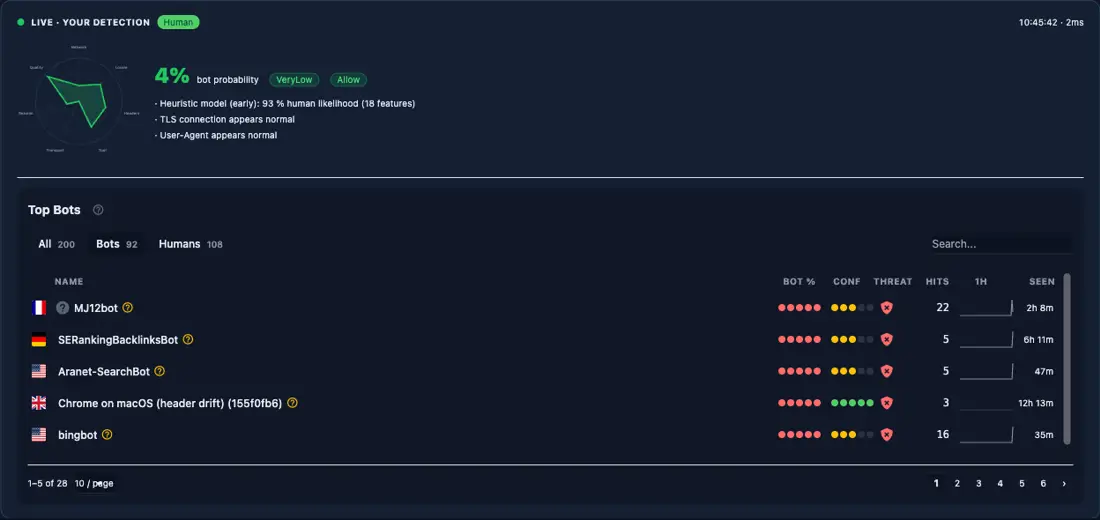
और के माध्यम से HttpContext विस्तार API:
ViewBag.IsBot       = HttpContext.IsBot();
ViewBag.IsHuman     = HttpContext.IsHuman();
ViewBag.Probability = HttpContext.GetBotProbability();
ViewBag.RiskBand    = HttpContext.GetRiskBand();
ViewBag.BotType     = HttpContext.GetBotType();
ViewBag.BotName     = HttpContext.GetBotName();
ViewBag.Reasons     = HttpContext.GetDetectionReasons().ToList();
विकास के दौरान विभिन्न वर्गीकरणों को सिमुलित करना
# Simulate a search engine crawler
curl -H "ml-bot-test-mode: googlebot" http://localhost:5200/Me

# Simulate a high-risk scraper
curl -H "ml-bot-test-mode: scraper" http://localhost:5200/Me

# Real browser (Playwright, Chrome, etc.) scores as human
सेट करें (S) EnableTestMode: true में appsettings.Development.json अगर आप उन शीर्षिकाओं को सम्मानित करना चाहते हैं
स्टेलोबोट UI उद्देश्य से छोटा है
| टैग सहायक | भूमिका |
|---|---|
<sb-human> केवल मानव के लिए रेंडर करें fallback ("देखें |
|
<sb-bot> सिर्फ बोट के लिए रेंडर करें fallback डिफ़ॉल्ट |
|
<sb-gate> Multi |
|
<sb-signal> एकल ब्लैकबोर्ड संकेत गेट signal, condition, value, fallback, negate |
|
<sb-honeypot> अदृश्य ट्रैप क्षेत्र prefix, fields डिफ़ॉल्ट |
|
<sb-badge> पहचान स्थिति चिप |
variant पूर्ण"/"compact"/"icon |
<sb-confidence> बोट संभाव्यता पट्टी display ("bar"/"text"/"bothM SK3 width |
|
<sb-risk-pill> जोखिम बैंड लेबल |
|
<sb-summary> कॉम्पैक्ट डिटेक्शन कार्ड variant à¤aà¥à¤°à¥à¤ |
|
<bot-detection-details> पूर्ण खोज विच्छेदन collapsed ( view डिफ़ॉल्ट |
<sb-gate> सामान्य है
<sb-gate human-only>...</sb-gate>
<sb-gate bot-only>...</sb-gate>
<sb-gate verified-only>...</sb-gate>
<sb-gate max-risk="Low">...</sb-gate>
<sb-gate min-risk="Medium">...</sb-gate>
<sb-gate bot-type="SearchEngine,VerifiedBot">...</sb-gate>
<sb-gate bot-type="AiBot" negate="true">...</sb-gate>
<sb-gate max-risk="Low" fallback="hide">...</sb-gate>
क्रम में जोखिम पट्टी VeryLow, Low, Elevated, Medium, High, VeryHigh, Critical.
<sb-signal> सीधे कच्चे ब्लैकबोर्ड संकेतों पर गेट condition गुण स्वीकार करता है exists, not-exists, true, false, equals, not-equals, gt, lt, gte, lte, contains, any-true, और all-true.
<sb-signal signal="ip.is_datacenter" condition="true">...</sb-signal>
<sb-signal signal="detection.probability" condition="gte" value="0.8">...</sb-signal>
महत्वपूर्ण डिजाइन विकल्प यह है कि ये मददगार रेंडरिंग के बारे में हैं
सर्वर के लिए
[BlockBots] bot के लिए 403 लौटाता है
[BlockBots]                                                         // block everything
[BlockBots(AllowSearchEngines = true)]                              // let Googlebot through
[BlockBots(AllowSearchEngines = true, AllowSocialMediaBots = true)] // SEO + social previews
[BlockBots(BlockCountries = "CN,RU", BlockVpn = true)]              // geo + network enforcement
फ्लैग अनुमति दें: AllowVerifiedBots, AllowSearchEngines, AllowSocialMediaBots, AllowMonitoringBots, AllowAiBots, AllowGoodBots, AllowScrapers, AllowMaliciousBots, AllowTools.
नेटवर्क फ्लैग BlockCountries, AllowCountries, BlockVpn, BlockProxy, BlockDatacenter, BlockTor.
[RequireHuman] से अधिक कठोर है [BlockBots]के माध्यम से केवल मानव के रूप में वर्गीकृत अनुरोध स्वीकार किए जाते हैं
[AllowBots] एक नियंत्रक से एक क्रिया छूट देता है [BlockBots].
[BlockBots]
public class AccountController : Controller
{
    public IActionResult Login() { }          // blocked

    [AllowBots]
    public IActionResult HealthCheck() { }    // passes through
}
[BotPolicy("name")] एक नामित नीति लागू करता है
[BotPolicy("strict")]
[BotPolicy("strict", BlockThreshold = 0.75, MinConfidence = 0.85, ActionPolicy = "throttle-stealth")]
[BotDetector("names")] पूर्ण नीति परिभाषित किए बिना निर्दिष्ट डिटेक्टर इनलाइन चलाता है
[BotDetector("UserAgent,Header,Ip", BlockThreshold = 0.8)]
[BotAction("name")] पता लगाने की नीति को बदलने के बिना क्रिया प्रतिक्रिया अधिरोहित करता है
[BotPolicy("default")]
[BotAction("challenge-captcha", FallbackAction = "block")]
public IActionResult Checkout() { }
[BlockIfSignal] और [RequireSignal] अलग-अलग ब्लैकबोर्ड संकेतों पर गेट
[BlockIfSignal("ip.is_datacenter")]
[RequireSignal("geo.country_code", Value = "GB")]
[SkipBotDetection] स्वास्थ्य जाँचों और मापन अंतबिंदुओं के लिए पूरी तरह से पता लगाने को पार करता है
सभी वर्गीकरण डेटा सीधे नियंत्रकों में उपलब्ध है
// Classification
bool isBot      = HttpContext.IsBot();
bool isHuman    = HttpContext.IsHuman();
bool isVerified = HttpContext.IsVerifiedBot();
bool isSearch   = HttpContext.IsSearchEngineBot();

// Scores
double prob       = HttpContext.GetBotProbability();   // 0.0 - 1.0
double conf       = HttpContext.GetBotConfidence();
RiskBand risk     = HttpContext.GetRiskBand();         // VeryLow ... Critical
ThreatBand threat = HttpContext.GetThreatBand();       // None ... Critical

// Bot identity
BotType? type = HttpContext.GetBotType();
string?  name = HttpContext.GetBotName();

// Network
bool isDc  = HttpContext.IsDatacenter();
bool isVpn = HttpContext.IsVpn();
string? cc = HttpContext.GetCountryCode();

// Raw signals (blackboard passthrough)
T? val = HttpContext.GetSignal<T>("ip.is_datacenter");

// Recommended action
bool allow   = HttpContext.ShouldAllowRequest();
bool block   = HttpContext.ShouldBlockRequest();
bool captcha = HttpContext.ShouldChallengeRequest();
न्यूनतम API अंतबिंदु में
app.MapPost("/api/order", (HttpContext ctx, OrderModel order) =>
{
    if (ctx.IsBot() || ctx.GetRiskBand() >= RiskBand.High)
        return Results.Forbid();

    return Results.Ok(ProcessOrder(order));
});
टैग सहायक और एक्सटेंशन विधि एक ही से पढ़ी जाती है per-request detection result
@info: whatsthis /_stylobot सक्रिय दृश्य है
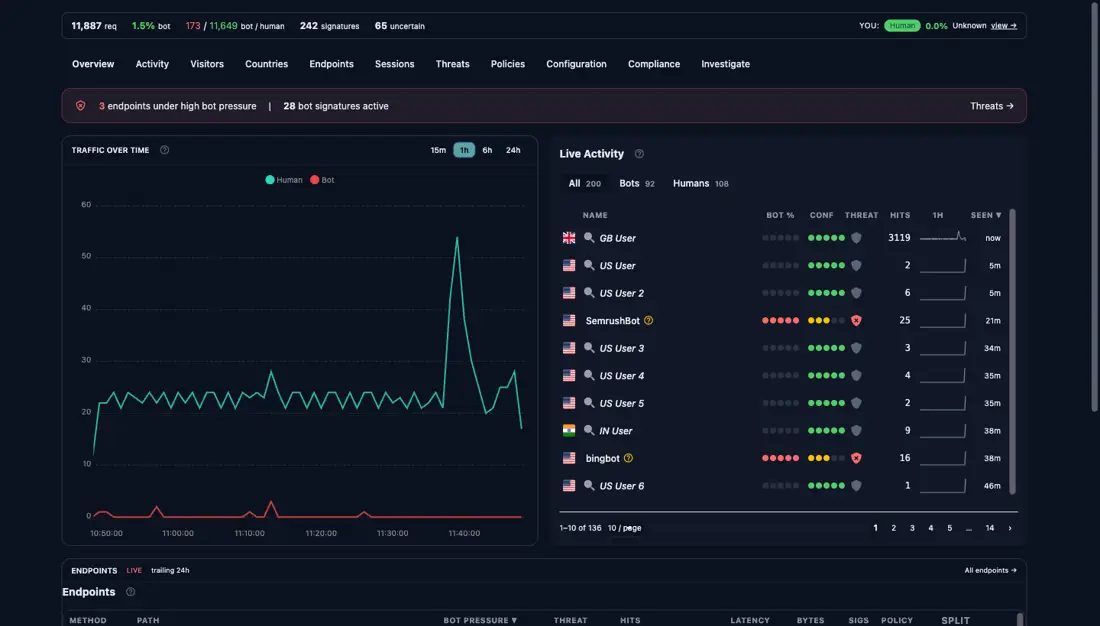
विभाजित पट्टी विशेष रूप से व्यावहारिक में उपयोगी हैं।
अगर आप उन अंगुलियों की छाप और व्यवहार सदिशों के पीछे निम्न स्तर मॉडल चाहते हैं-- जो इस प्रकाशन श्रृंखला में पहली पोस्ट में शामिल है व्यवहार, पहचान नहीं.
ब्लॉक/allow एक स्विच है।
एक स्विच अनिश्चितता को पीड़ा में बदल देता है।
यह है कि StyloBot UI के लिए है
जारी श्रृंखला में अगला: लंबे समय तक चलाने वाले नेट सेवाओं में असीमित विकास का पता लगाना और स्थिर करनाविश्वसनीयता पुनः कार्य जो स्टिलोबोट के सदिश समानता परत को एक GB LOH टाइमबॉम से कुछ हो गया है जिसे आप पि पर अपरिभाषित रूप में चल रहे छोड़ सकते हैं व्यवहार-Aware TypeScript UI एक ही खोज परिणाम Express में लेता है , Fastify , और क्लाइंट के लिए ब्राउज़र

© 2026 Scott Galloway — Unlicense — All content and source code on this site is free to use, copy, modify, and sell.
